Credit notes
Create credit notes online
Got an invoice wrong, or taken a return? Create a credit note straight from the original, credit all of it or just a line, and let the amounts and VAT reverse cleanly in your books — no editing a document your customer already has.
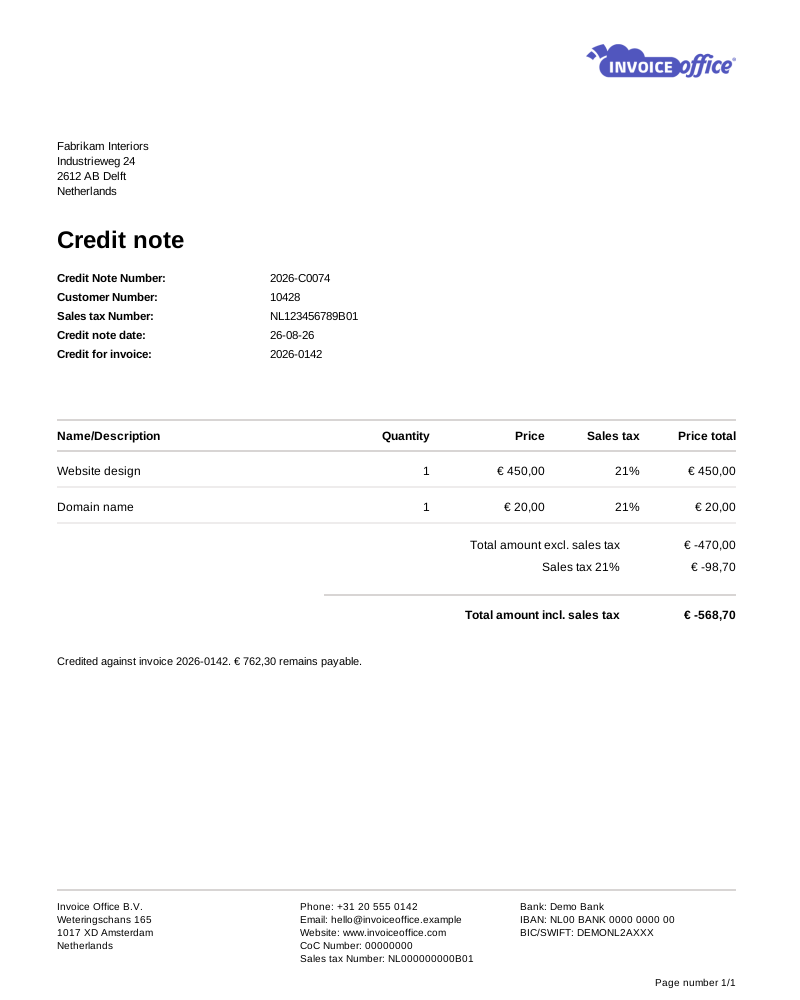
Everything on the credit note
Correct an invoice the right way
Mistakes and returns happen. What matters is that the correction is documented, matches the original, and leaves your books and your VAT return telling the truth.
- Credit an invoice you already sent
- A sent invoice is a legal document, so you correct it with a credit note rather than editing it. Create the credit note from the original and the lines and amounts come with it.
- Customisable credit note templates
- Start from a ready-made design or build your own — logo, fonts, colours and layout. A credit note is still a document your customer files, so it should look like the invoice it corrects.
- Import lines from Excel
- Crediting a long or complex invoice? Fill the import template with a product number and a quantity per line and the matching products come from your catalog — no manual re-entry. Up to 300 lines, on a Pro license.
- Multiple languages & currencies
- Credit in the same language and currency you invoiced in. Both are set per customer, so the correction reads and adds up exactly the way the original did.
- Add document texts
- Explain the correction properly with an introduction, closing message, payment and document terms — plus internal notes that stay private to your team.
- Books and VAT stay correct
- A credit note posts to your journals exactly as an invoice does — only the other way round. The amounts and the VAT reverse against the original, and Journal data on the Action menu shows you the entries it produced.
- UBL and Peppol, same as an invoice
- Credit notes are the one other sales document that carries full e-invoicing. Invoice UBL XML sits on every finalized credit note, and Send to Peppol appears once your Peppol connection is active — so the correction reaches your customer’s system the same way the invoice did.
- Returned goods go back on the shelf
- A credit note is an inbound document, so the products on it are added back to stock automatically — no separate correction, and no drift between what you credited and what you hold.
Amounts & totals
Credit back exactly the right amount
A credit note is a number you are giving back, so it needs to be right to the cent. Shape the whole totals section — labels, fields, discounts, deposits and shipping — so the credit mirrors the real transaction rather than an approximation of it.
Text lines & subtotal sections
Break the credit down with free text lines and subtotal sections, so the customer can see exactly which charges are being reversed and why — not just a single net figure.
Custom total labels
Rename and restyle the totals row to match your business terminology, in the language of the document, so your credit notes stay consistent with the rest of your paperwork.
Configure grand total fields
Add or remove the fields under the lines and define how totals are calculated and displayed — useful when special charges, adjustments or custom tax rules are involved.
Advanced discount & amount options
Apply line discounts, grand total discounts or payment-term discounts, and account for advance payments, deposits and shipping — so the credit reflects the real transaction.
How it works
Corrected and credited in three steps
Step 1Start from the invoice
Open the invoice that needs correcting and create a credit note from it. The customer, lines, prices and VAT rates carry over, so you are editing rather than retyping.
Step 2Credit all of it, or part
Reverse the whole invoice or just the lines and amounts that were wrong. Adjust discounts and totals so the credit matches exactly what you owe back.
Step 3Send it and settle up
Email the credit note as a branded PDF. The amounts and VAT reverse against the original in your books, and the outstanding balance updates on its own.
Credit note questions, answered
What is a credit note?
Why can’t I just edit or delete the invoice?
Can I credit only part of an invoice?
What happens to the VAT on a credit note?
Is a credit note the same as a refund?
Can I create credit notes on the free plan?
More answers in our FAQ and help center.
Related
The rest of your sales documents
Keep your books straight
Invoices, credit notes and VAT in one place. Free to start, no credit card.