Recurring purchases
Automate your recurring purchases
Recurring purchase software turns the subscriptions, utilities and regular supplier invoices you retype every month into entries that generate themselves — so your fixed costs are recorded, forecasted and never missed.
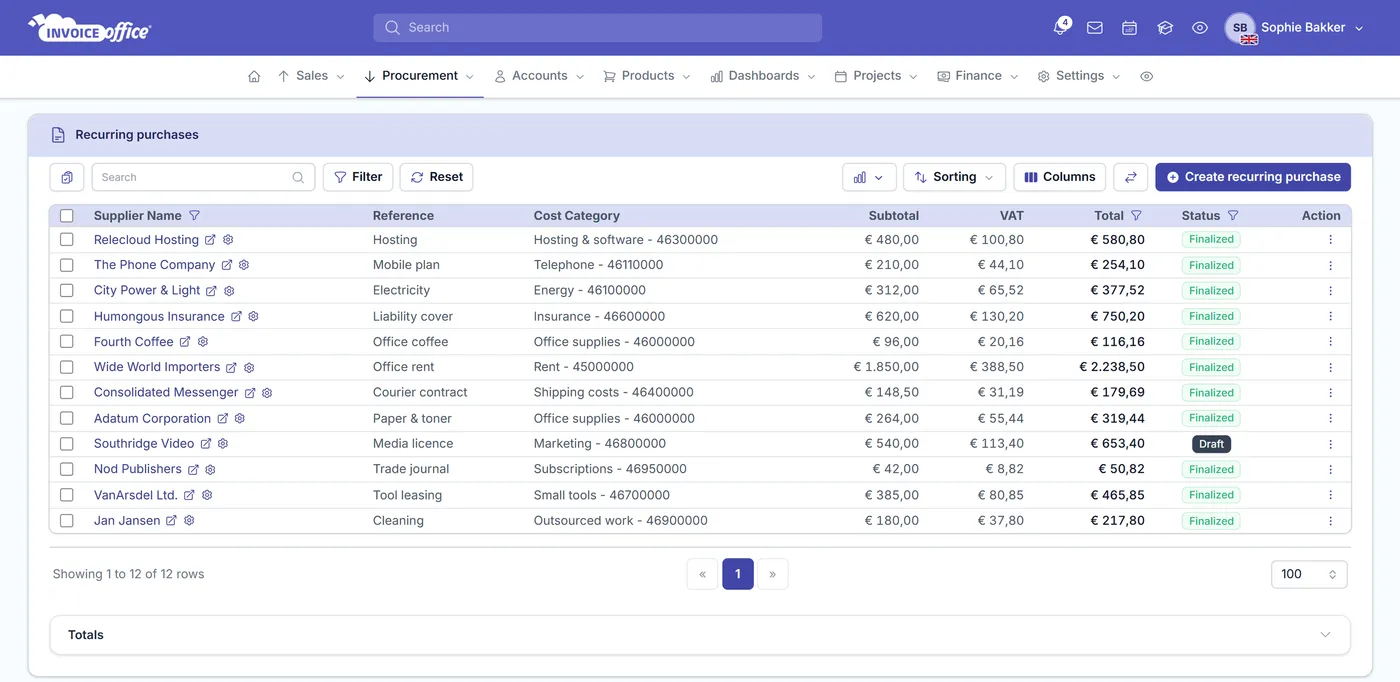
Stop re-keying, start automating
Total control over your fixed costs
Knowing your predictable expenditure is the first step to smart budgeting. Recurring purchases don’t just record history — they let you plan for what is already committed.
Set it once, then leave it
Define the purchase once, set its Cycle, and the entries are generated for you from then on. No more typing the same subscription or supplier invoice in every single month. Recurring purchases are part of the Pro license.
Save hours of repetitive admin
The time you spend re-entering identical expenses adds up quietly. Automating them gives that time back without you having to think about it again.
Fewer data entry errors
Repetitive manual input is where typos come from. An automated entry is the same every period, so the numbers in your books are the numbers you agreed.
Accurate forecasting
The recurring purchase dashboard gives you a Forecast, an Upcoming schedule and what is Scheduled this month — so rent, hosting and licences are seen coming rather than discovered as they land.
Never miss a payment
Expiring soon flags the agreements running out, and a Cycle distribution shows how your commitments fall across the year — so nothing essential lapses because an invoice went unnoticed.
Better budgeting
Total value and Top recurring by value give your monthly expense reports a solid foundation, because the fixed part of your spending is already recorded and accounted for.
What to automate
The costs that never change
If an expense arrives on a predictable schedule for a predictable amount, it should not be typed out by a person every period. These are the ones worth setting up first. It is the buy-side mirror of recurring invoices, and each entry it creates is an ordinary purchase.
Subscriptions & software licences
The tools your business runs on bill on the same date for the same amount every period. That is exactly the kind of cost that should never need typing twice.
Rent & utilities
Rent and utility bills are the most predictable costs you have, and usually the largest. Recording them automatically keeps the biggest numbers in your forecast accurate.
Hosting & recurring services
Hosting, domains and ongoing service agreements renew whether or not anyone is watching. Automating them means the cost is booked before the renewal, not after.
Regular supplier invoices
Suppliers you buy from on the same terms every month belong here too — the purchase is created for you, against the right supplier, at the right interval.
How it works
Set it up once, in three steps
Step 1Set up the purchase
Create the purchase once against the right supplier, with the lines, amounts and tax rates the recurring cost actually carries.
Step 2Choose the interval
Pick the Cycle — Weekly, 2 Weeks, 4 Weeks, Monthly, 2 Months, Quarterly, Half yearly or Yearly — then set Create on and Create until to say when the schedule starts and when it should stop.
Step 3Let it run
The purchase entries are generated for you at each interval. Your fixed costs are recorded, your forecast is current, and nothing depends on someone remembering.
Recurring purchase questions, answered
How often can a recurring purchase repeat?
What is a recurring purchase?
Which expenses should I automate?
How do recurring purchases save time?
Can I forecast my fixed costs?
Do recurring purchases help with budgeting?
How is this different from a normal purchase?
More answers in our FAQ and help center.
Related
More of the buy side, automated
Stop re-keying your fixed costs
With our software we make the lives of entrepreneurs easier. Free to start, and 14 days free on every paid plan.