Multiple languages
Invoice in multiple languages
Send invoices in your customer’s language while you keep working in your own. Invoice Office runs in nine languages, and stores your templates, terms, product names and VAT texts per language — so a cross-border invoice needs no translating at send time.
Free plan available · 14-day trial on paid plans · No credit card
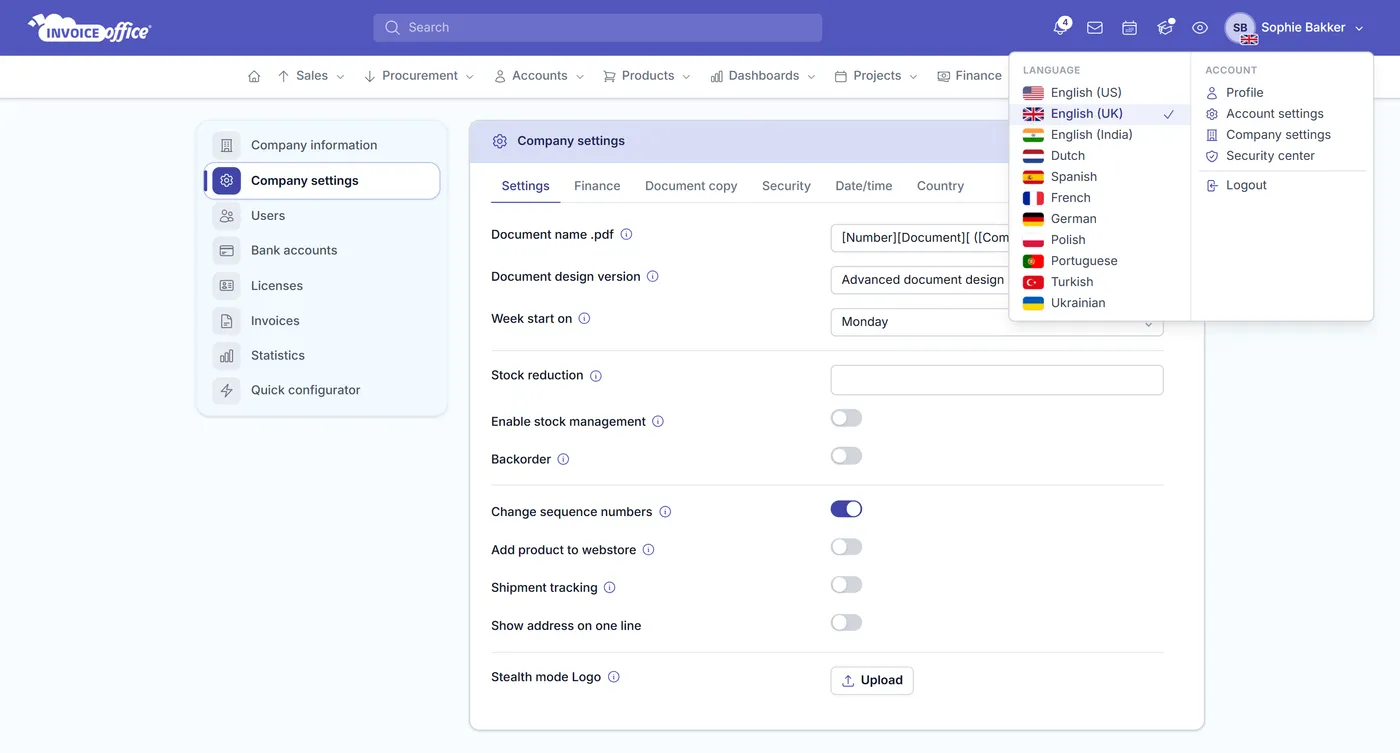
Supported languages
Nine languages, thirteen variants
The same list applies everywhere — the interface you work in, the language a document goes out in, and every per-language setting behind it. Each account sees the eleven variants that apply to its country.
- Languages
- 9Languages
- Regional variants
- 13Regional variants
- Setting per customer
- 1Setting per customer
English
- United States
- United Kingdom
- India
Dutch
- Netherlands
- Belgium
German
- Germany
- Austria
French
- France
Spanish
- Spain
Polish
- Poland
Portuguese
- Portugal
Turkish
- Türkiye
Ukrainian
- Ukraine
Pick yours for the app, and set each customer’s on their customer record.
Translated where it counts
More than a translated menu: what is stored per language
Plenty of software translates its own buttons and leaves your documents in English. Here the document is what gets translated — headings, terms, product lines and legal texts included.
- The whole app in your language
- Not a translated menu bar over an English product — the interface, labels and help text all follow the language you pick. Each colleague sets their own, so your Polish bookkeeper and your Dutch sales rep both work in theirs.
- A language per customer
- Set the language once on the customer record. Every invoice, quote, reminder and email for that customer is created in it from then on — nobody has to remember who gets which language.
- Document templates per language
- Keep a separate document design for each language, with its own headings, column labels and standard texts. Your French invoice is laid out and worded for a French client, not machine-translated at send time.
- Email templates per language
- The covering email is stored per language too, so the message that carries a Spanish invoice is written in Spanish — subject line included.
- Product names & descriptions translated
- Add a translation of a product’s name and description per language, and the document prints those instead of your own — the line items read in your customer’s language, which is where confusion, and slow payment, usually starts.
- Terms & conditions per language
- Payment terms, delivery terms, document terms and reminder terms are each stored per language, so the small print at the bottom is never the one part left in English.
Localisation
Localisation: dates, currency and VAT wording
Selling across a border changes more than the wording. Dates, currencies and the VAT sentence at the bottom of the invoice all have to match the market you are billing into — and getting one of them wrong is what turns a routine invoice into a query.
VAT & legal texts per language
Store the legal text for a VAT code in each language — reverse-charge wording, exemption reasons and the rest. The right sentence lands on the document automatically instead of being pasted in by hand.
Date formats that match the market
Date format is set on the company and again per user, so 03-04 is never read as the wrong month by a client on the other side of a border. Decimal symbol and Thousand sign sit in the same settings, per company and per user.
Currencies alongside languages
Currency is set per customer and per document, each carrying the conversion rate that applied when it was made. Language and currency are independent, so you can bill a Belgian client in euros in French without touching either default.
Localised country & address data
Country names have their own translations, so an address reads correctly on the document rather than showing an English country name in the middle of a German invoice.
How it works
Set it once per customer
Step 1Pick your own language
Choose the language you want to work in. The app follows you, and it is a per-user setting — your colleagues are not forced onto the same one.
Step 2Set the language on the customer
On the customer record, choose the language they should receive documents in — plus their currency, if it differs from yours.
Step 3Send in their language, work in yours
Invoice Office picks the matching document design, email template, terms, VAT texts and product translations. You keep reading everything in your own language.
Multi-language invoicing questions, answered
Which languages does Invoice Office support?
Can I send an invoice in a language I do not work in myself?
Are product names and descriptions translated as well?
Can I use a different invoice template per language?
How does it handle VAT wording like the reverse charge?
Can each user work in their own language?
More answers in our FAQ and help center.
Related
Where the language setting shows up
Ready to invoice across borders?
Set the language once per customer and let every document follow. Free to start, and no credit card to try it.