Tax codes
Tax code setup, done once
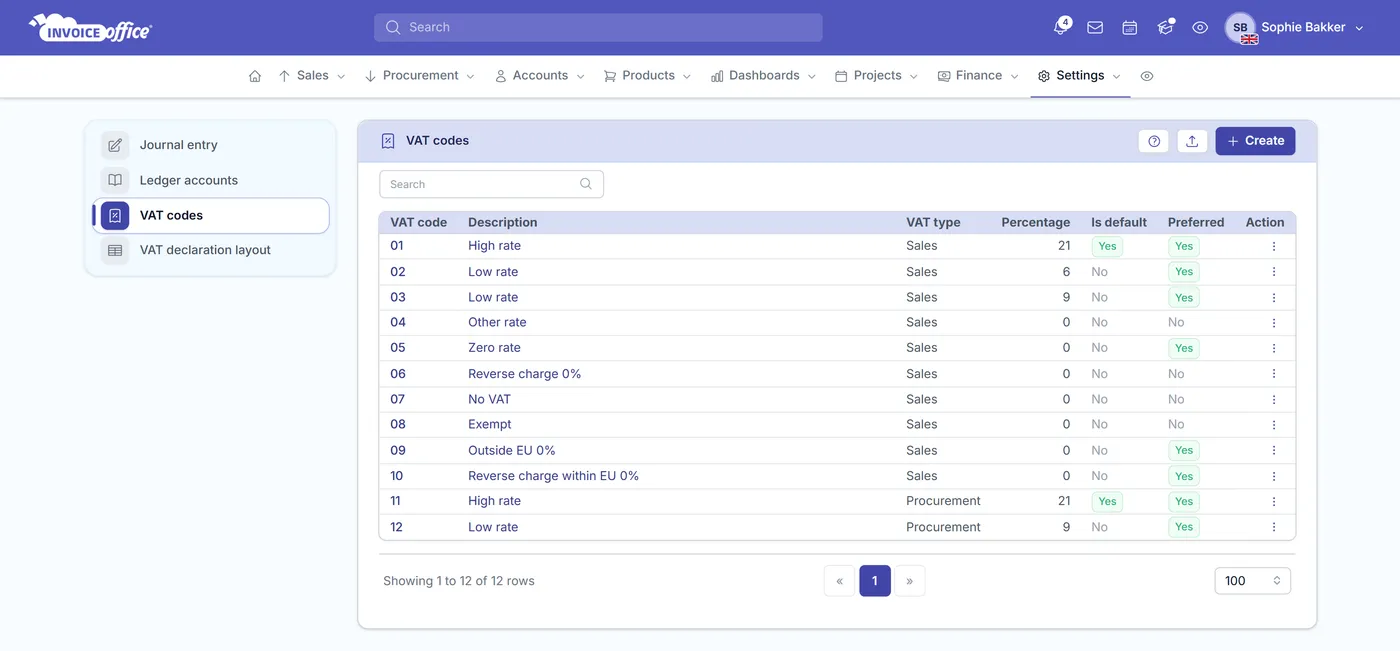
Tax code setup — VAT codes, in the app’s own words — is where VAT quietly goes wrong: one bad rate and you have mischarged a customer and misreported a quarter. Set your VAT codes up once, with the rate, the ledger accounts and the legal text on each, and every invoice calculates itself from there.
Compliance, simplified
Set your tax codes up once, get VAT right always
Complex tax obligations turned into a simple process: accurate, quick and compliant, so you can get back to running the business rather than researching rates.
- A code, a rate, a treatment
- Each VAT code carries its code, description, type and VAT type. Set it once and every document line that uses it is treated the same way, without anyone deciding per invoice.
- Rates that change on a date
- A percentage is held with a start and end date, so when a rate changes you add the new period to the same code. Old documents keep the rate that applied when they were raised.
- Points at your ledger accounts
- Every code names the ledger account for VAT to pay and the one for VAT to claim, which is what puts the amounts in the right place in your books without a second entry.
- The legal text, per language
- A reverse-charge or exemption sentence can be stored on the code for each language you invoice in, so the right wording prints on the document your customer actually receives.
- Feeds the VAT declaration
- Codes are assigned to the sections of your VAT declaration layout. That mapping is what turns a period of documents into a return laid out box by box.
- Default, preferred, or blocked
- Mark the code most lines should use as the default, flag the ones you reach for often as preferred, and block the ones you no longer want anybody picking.
From code to document
The right rate, every time
A code is only worth setting up if it reaches the document by itself. These are the four points where that happens — what carries the code, when the VAT is worked out, how far down the rate can go, and how you get your existing codes in.
Set once, applied everywhere
Codes attach to your products and ledger accounts, so the VAT on a line is decided by what you are selling rather than by whoever is typing the invoice.
Calculated as you invoice
VAT totals are worked out on the document as it is created, and shown per rate, so the figure on the invoice and the figure in your return come from the same place.
State and local rates where they apply
For regions that tax below national level, a percentage period can also carry state, county and city rates. It is an option for the places that need it, not something in your way if you do not.
Import your existing codes
Moving from another system? Import your VAT codes and your ledger accounts from a file rather than retyping the lot, with sample files showing the shape expected.
How it works
Compliant in three steps
Step 1Create the code
In Settings, then VAT codes, give the code its description, type and VAT type, and name the ledger accounts VAT should be paid to and claimed from.
Step 2Add the percentage
Set the rate with the dates it applies between. When the rate changes later, you add the next period rather than starting a new code.
Step 3Map it to your return
Assign the code to the sections of your VAT declaration layout, add the legal text for each language you invoice in, and every document from then on carries it.
Tax code questions, answered
What is a tax code (VAT code)?
What happens when a VAT rate changes?
Where does VAT end up in my books?
Can I print a reverse-charge or exemption notice?
How do VAT codes connect to my VAT return?
Does it handle taxes below national level?
Can I bring codes over from another system?
More answers in our FAQ and help center.
Related
Where your tax codes end up
Set up compliance without the complexity
With our software we make the lives of entrepreneurs easier. Free to start, and 14 days free on every paid plan.