Purchase orders
Create purchase orders online
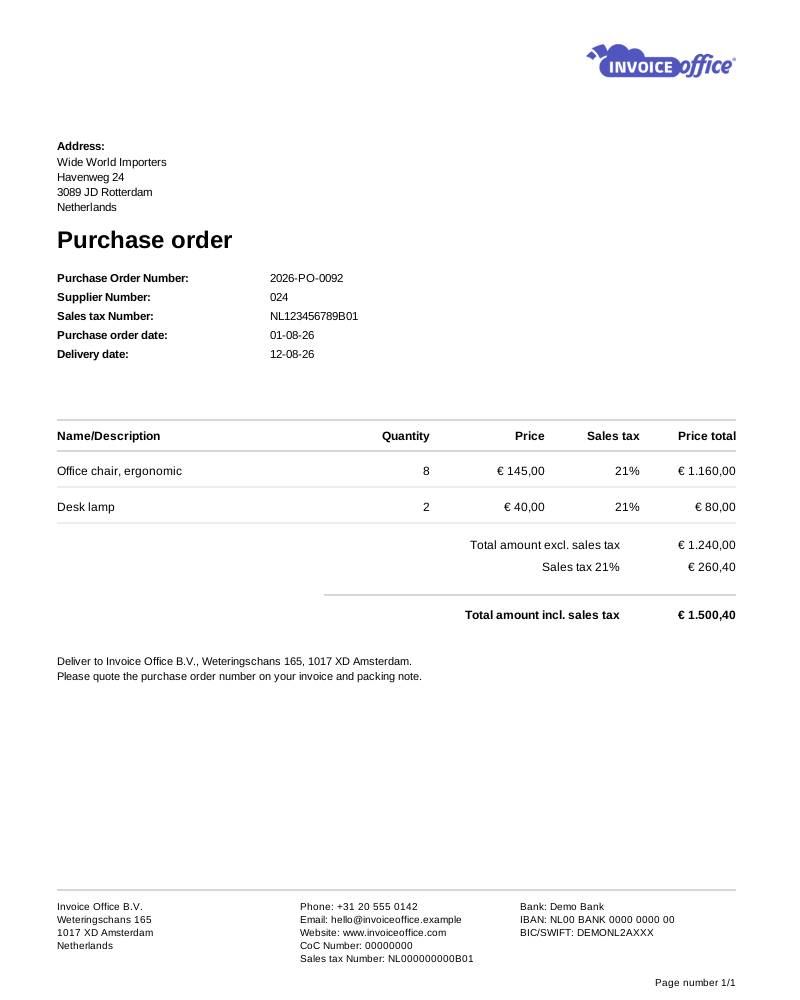
Purchase order software that replaces the email thread. Raise the order straight from the supplier, send it branded and in their own language, and keep it beside the purchase you register later — so buying is planned rather than discovered when the invoice lands.
Features that drive results
Stop the paper trail
A purchase order system takes the guesswork out of buying: what you ordered, from whom, on what terms and at what price — recorded on the supplier instead of scattered through an email thread.
Raised from the supplier record
Create purchase order sits on the supplier’s own Create menu, so the order opens with their address, currency, language and send-to details already filled in. You are agreeing the order, not re-typing who you are ordering from.
Customisable PO templates
Generate professional, consistent purchase orders instantly, with your company branding and the terms that need to be on them every time.
Its own numbering and design
Each supplier’s purchase orders take their own document design, sequence number and email template from that supplier’s settings page, so the order that lands in their inbox looks and reads the way you agreed.
Agreed prices on every line
Build the order line by line from your product catalog, with the quantity, unit and price you agreed. What you committed to is written down before the goods move, not reconstructed from an email when the invoice disagrees.
A promise, not a receipt
A purchase order is a commitment to a supplier, not goods in the building — so it deliberately never moves your stock. The purchase you register when the delivery actually arrives is what does that.
Draft, final, and what happens next
An order stays a draft until you finalise it, and finalised orders show on the supplier’s dashboard beside their purchases and credit notes — so what is still an intention and what is a commitment are never the same column.
Make it yours
Shaped around how you buy
Every business buys differently. Choose the fields you want on the overview, order in your supplier’s language and currency, and keep the document terms, attachments and internal notes with the order they belong to. When the goods and the bill arrive, you register that as a purchase against the same supplier.
Columns, shaped twice
Display Columns picks which fields appear on the order lines and can rename their titles. Your purchase order overview has its own Columns picker, so the document and the list are each shaped to the question you actually have.
Multiple languages
Send a purchase order in your supplier’s language. Set it per supplier and the document follows, which matters the moment you buy across a border.
Multiple currencies
Order in the currency you are being billed in, without converting anything by hand before the order goes out or after the invoice comes back.
Terms, attachments & internal notes
Set the Document terms that apply, attach supporting documents, and record an Internal note only your team sees. On Pro you can add an Internal attachment to it too. Whatever explains the order stays with the order, for whoever opens it in six months.
How it works
From order to registered purchase
Step 1Raise it from the supplier
Use Create purchase order on the supplier’s Create menu. Their address, currency, language, payment days and send-to details come off the supplier record, so the order starts out correct rather than being corrected later.
Step 2Add the lines and send
Add what you are ordering, then email it out on that supplier’s document design and email template, to their default send-to address — in their own language and currency, with any supporting documents attached.
Step 3Register the purchase when it lands
When the goods and the supplier’s invoice arrive, register that as a purchase against the same supplier. That is the document that books the cost, moves your stock and carries the payment.
Purchase order questions, answered
What is a purchase order?
How do purchase orders help control spending?
Does a purchase order change my stock?
Can I send a purchase order in another language or currency?
Can I choose which columns appear on a purchase order?
Can I attach documents and add internal notes to a purchase order?
More answers in our FAQ and help center.
Related
What happens after the order is placed
Take control of your spending
With our software we make the lives of entrepreneurs easier. Free to start, and 14 days free on every paid plan.