Purchases
Purchase registration software for supplier invoices
Purchase registration in Invoice Office means never retyping a supplier invoice. Drag the document in, import a UBL XML file, assign the cost to a project, and let your stock levels update off the same purchase lines.
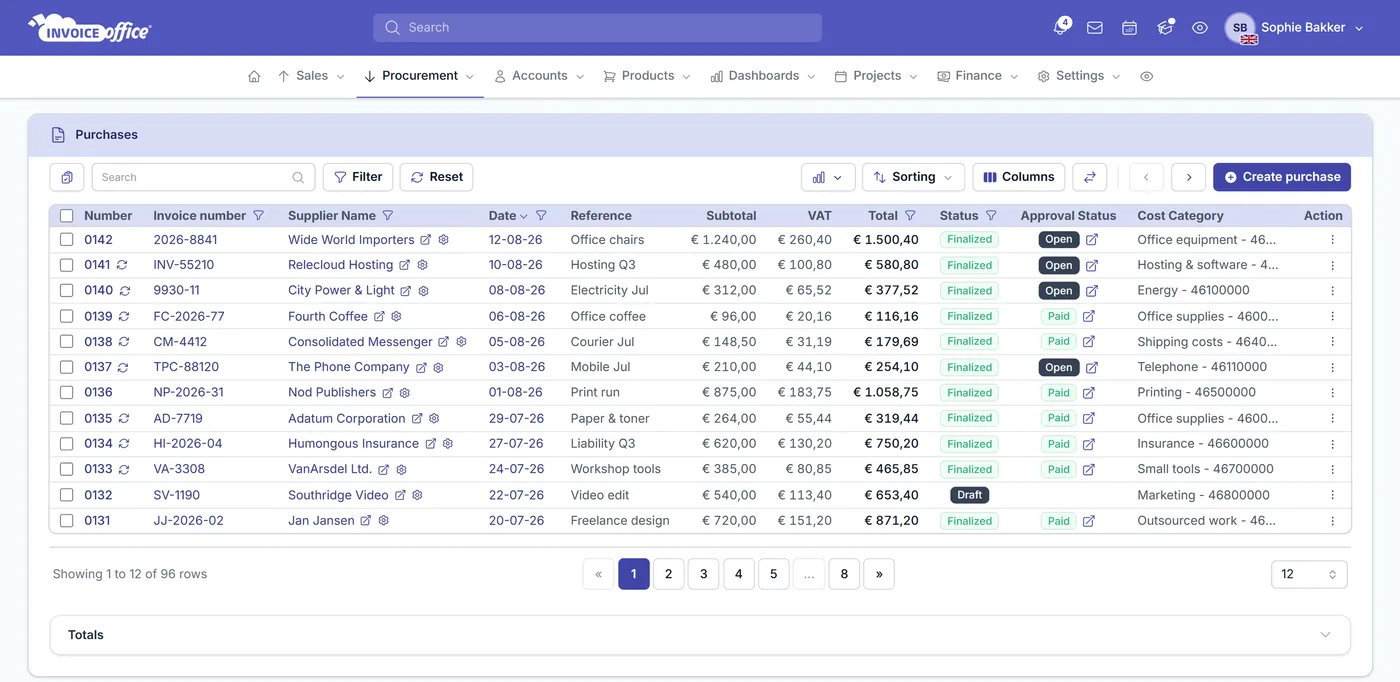
Everything on the purchase
Get the paperwork in, then let it work
A purchase is admin nobody enjoys. Capture it in the fastest way available, and the same record feeds your project costs, your stock levels and your VAT return.
Register a supplier invoice
Connect the supplier and set everything the document needs — their invoice number, your reference, the key dates and the payment itself. Handed a till receipt instead? That is receipt registration, and it works the same way.
Drag and drop, or import UBL
Drag the supplier invoice straight onto the create page, or pull it in from a connected Google Drive, Dropbox or OneDrive. Drop a single UBL .xml on the same zone and it is imported as a purchase rather than attached as a file. Cloud storage and UBL import are Pro license features.
UBL XML processing
Upload a UBL file in XML format and the supplier details, invoice number, VAT rates and amounts are read and processed automatically — no retyping. UBL import is part of the Pro license.
Project cost integration
Assign a purchase to a project and the cost lands against that project, feeding your project dashboards and reports. The field appears once you have projects to assign to.
Purchase lines
Add as many rows as the document needs: set the Cost Category on each line, pull products from the product module or type a description, and set quantity, price and VAT. Add notes too.
Product stock integration
Finalise a purchase and stock positions update from the products on its lines and the quantity you registered. Stock movement on documents you save yourself is part of the Pro license.
Purchase details
A complete, auditable record
A purchase is only useful if it is complete. Connect the supplier, record their invoice number and the dates that matter, and shape the purchase lines around the fields you actually use — those lines are what move yourstock levels. A till receipt goes in the same way; see receipt registration.
Supplier insight while you type
Pick the supplier and the sidebar shows what you already owe them: the outstanding balance across open bills, how many are open, and the most recent ones — so you register the new bill knowing where the account stands.
A warning before you pay twice
Enter a supplier invoice number that supplier has already billed you under and an inline warning appears on the spot. It does not block you — sometimes a number really is reused — but the classic double payment stops being something you find months later.
Key dates
Invoice date, due date and payment date on every purchase — the three dates that tell you what is owed, what is late and what is settled.
Choose your purchase line columns
Display Columns turns purchase line fields on and off — and renames their titles — so a line matches how you register a bill. Cost Category is the exception: it leads every purchase line as a fixed first column with its own searchable picker.
How it works
From a supplier invoice to booked cost
Step 1Capture the purchase
Drag and drop the invoice or receipt onto the create page, pull it from Google Drive or Dropbox, or upload a UBL XML file and let the supplier, amounts and tax rates fill themselves in.
Step 2Complete the lines
Add the purchase lines with their Cost Category, products, quantity, price and VAT, and assign the purchase to the project it belongs to.
Step 3Register the payment
Record the payment and the method used. Finalise the purchase and your stock positions and project cost data update off the same record, so your reports stay current.
Purchase questions, answered
How do I register a purchase invoice or receipt?
Can I drag and drop a purchase invoice?
What is UBL XML processing?
Can I assign a purchase to a project?
Do purchases update my stock levels?
What stops me paying the same supplier invoice twice?
Can I turn a purchase into a recurring one?
Can I change which columns appear on a purchase line?
More answers in our FAQ and help center.
Register your next purchase in seconds
With our software we make the lives of entrepreneurs easier. Free to start, and 14 days free on every paid plan.