Payment reminders
Create payment reminders online
Stop chasing overdue invoices by hand. Invoice Office creates the reminder from the invoice, adds any fee or interest you charge, and follows up on your schedule — until the payment lands and the chase stops on its own.
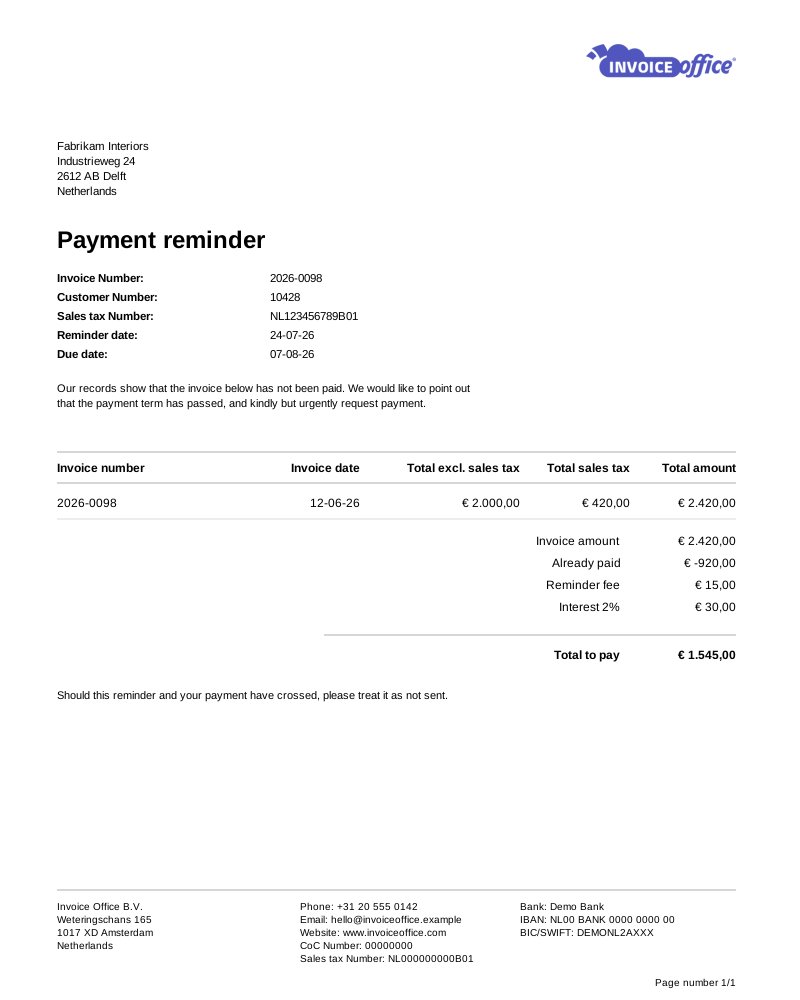
Everything on the reminder
Follow up without the awkwardness
Chasing money is the part of running a business nobody enjoys. Set the wording and the schedule once, and let the reminders do it for you — consistently, and in your own voice.
- Customisable reminder templates
- Design the reminder once — your logo, your layout, your tone — and reuse it for every customer. Polite but firm reads better than an automated-looking demand, and it gets paid faster.
- As many reminder stages as you need
- Create payment reminder sits on any finalized invoice that is not yet fully paid. Behind it is a ladder of stages you define — each with its own name, wording, email template, timing and charges — and Invoice Office always offers you the next one along.
- Reminder terms per customer
- Reminder terms are set up per document type and language, with one marked as the default, and the right set is attached to each customer. A long-standing client and a chronic late payer do not need the same follow-up schedule.
- Automatic or manual workflows
- Switch auto-send on for a stage and its reminders go out on their own once an invoice expires. Leave it off and nothing is sent automatically — you raise the reminder yourself with Create payment reminder on the invoice, and it opens as a Draft for you to check and send.
- Document texts per stage
- Write different wording for each stage of the chase, so a first friendly nudge and a final notice do not go out saying exactly the same thing.
- Attachments & the original invoice
- Send the reminder with the original invoice attached, plus any contract or agreement you add to it, so the customer can verify what is owed without emailing you back to ask.
Amounts & terms
Ask for the right amount
A reminder is not just a copy of the invoice. It can carry a fee, add interest, and account for anything already paid — so the number on it is the number your customer genuinely still owes.
Reminder fees
Add an administration fee to cover the cost of chasing. It is set per reminder stage in your reminder terms, so a later reminder can carry a higher fee — and it applies consistently rather than being decided per invoice.
Interest on late payment
Charge an interest rate on top, calculated as a percentage of the invoice amount and set per reminder stage. Showing the cost of paying late clearly is one of the more effective ways to move an invoice up someone’s pile.
Outstanding balance after part payments
Amounts already paid are deducted, so the reminder asks for what is genuinely still owed. Chasing a customer for money they have already sent costs you goodwill.
Expiry dates & escalation
The automatic reminder goes out on the day the invoice falls due. Each stage then gives its reminder its own expiry period, and that date is what tells you when the next stage is due.
How it works
Overdue to paid, without the chasing
Step 1The invoice goes overdue
Invoice Office tracks the payment term on every invoice and flags it the moment it expires — you do not have to watch due dates or reconcile the bank by hand to notice.
Step 2The first reminder goes out
A branded reminder is created from the invoice with any fee or interest applied. With auto-send on it is emailed straight away; otherwise you raise it yourself with Create payment reminder, and it opens as a Draft for you to check, attach the invoice and send.
Step 3Follow-up until it is paid
Still nothing? Create payment reminder raises the next stage in the ladder, with its own wording and charges. As soon as the payment is registered, the chase stops on its own.
Payment reminder questions, answered
What is a payment reminder?
Can reminders be sent automatically?
How many reminders can I send for one invoice?
Can I charge a fee or interest for late payment?
What happens if the customer paid part of the invoice?
Do reminders stop once the invoice is paid?
More answers in our FAQ and help center.
Related
The rest of the getting-paid flow
Get paid without the chasing
Let your reminders run themselves. Free to start, and no credit card to try it.