Quotes
Create professional quotes online
Quote software for small businesses and freelancers. Send a branded quote in minutes, let your client accept it online, and turn the accepted quote into an invoice in a single click — without retyping a line.
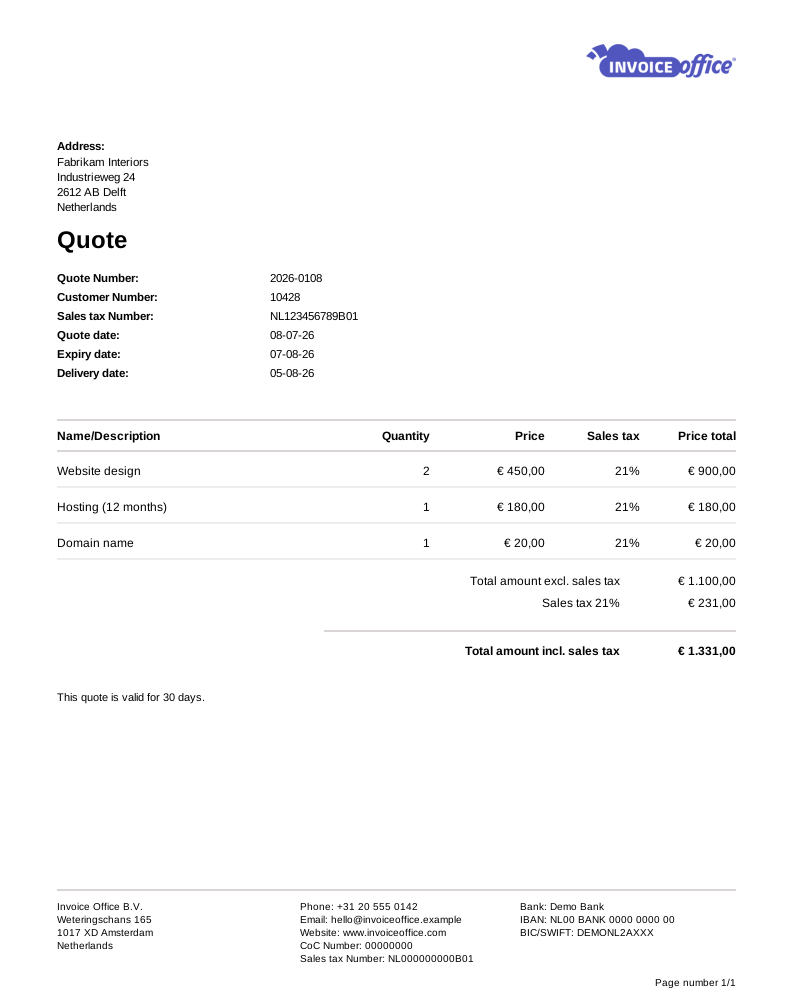
Everything on the quote
Win the work, then bill it
A quote is the first document a prospect sees. Make it look right, make it easy to accept, and make sure it flows straight into the invoice when it does.
- Send with digital approval
- Send with digital approval emails the quote with a link to an online copy. Your client reads it and signs it right there in the browser — no printing, posting or scanning — and the quote’s Approval Status switches to Agreed the moment they do.
- Quote reminders that chase for you
- Send quote reminder follows up on an offer that has gone quiet, using the reminder terms you set per document type and language. Set a stage to send automatically and the chase runs on schedule without you.
- Customisable quote templates
- Set your logo, colours, columns and terms once and every quote goes out looking the same. A consistent, professional quote is the first thing a new client judges you on.
- Turn a quote into an invoice
- Once the quote is agreed, the Action menu turns it into an invoice, an order confirmation, a packing note or a proforma invoice. Nothing is retyped, so the price your client agreed is the price you bill.
- Import quote lines from Excel
- Quoting a big job with dozens of line items? Fill the import template with a product number and a quantity per line, and the matching products — descriptions, prices and VAT — come from your catalog. Up to 300 lines, on a Pro license.
- Multiple languages & currencies
- Quote a client in their own language and currency. Set both per customer and the document and its totals follow — useful the moment you sell across a border.
- Attachments & document texts
- Add an introduction and closing note, spell out your terms and validity period, and attach brochures, drawings or specifications to the quote email.
Amounts & margin
Know the margin before you send
Quoting is where profit is won or lost. Invoice Office gives you the full set of controls over discounts, deposits and totals — and shows you what the job is actually worth while the quote is still a draft.
Profit before you send (Pro)
Enter what the work will cost you and see the margin on the quote while you are still writing it — so you find out it is too thin before the client accepts, not after.
Discounts, deposits & shipping
Discount a single line or the grand total, ask for an advance payment or deposit up front, and add shipping costs as their own clearly labelled amount.
Text lines & subtotal sections
Group a large quote into phases or work packages with free text lines and per-section subtotals, so the client can see and approve the cost of each part.
Advanced grand total configuration
Rename the totals row to match how your business talks, and choose which fields show under the lines — net, VAT per rate, discount, shipping, deposit and advance payment.
How it works
From quote to accepted in three steps
Step 1Build the quote
Pick a customer, pull products and prices from your catalog, and set the Expiry date. VAT and totals are calculated as you type, in the client’s language and currency.
Step 2Send it for approval
Email a branded PDF with a link to approve online. Your client reviews it, signs it in the browser, and the Approval Status switches to Agreed the moment they do.
Step 3Convert and get paid
An agreed quote becomes an order confirmation, packing note, proforma or invoice in one click — carrying the same lines, prices and terms straight through to getting paid.
Quoting questions, answered
Can I create quotes for free?
How does online quote approval work?
Can I turn an accepted quote into an invoice?
What is the difference between a quote and a proforma invoice?
Can I set how long a quote stays valid?
Can I see whether a quote is still open?
More answers in our FAQ and help center.
Related
What happens after a quote is accepted
Send your next quote today
Less admin, more won work. Free to start, and 14 days free on every paid plan.