Price lists
Product price lists for every customer segment
Not every customer should pay the same. Build price lists for wholesale and retail, loyal and new customers, connect one to a customer, and let every invoice and quote pick up the right price on its own.
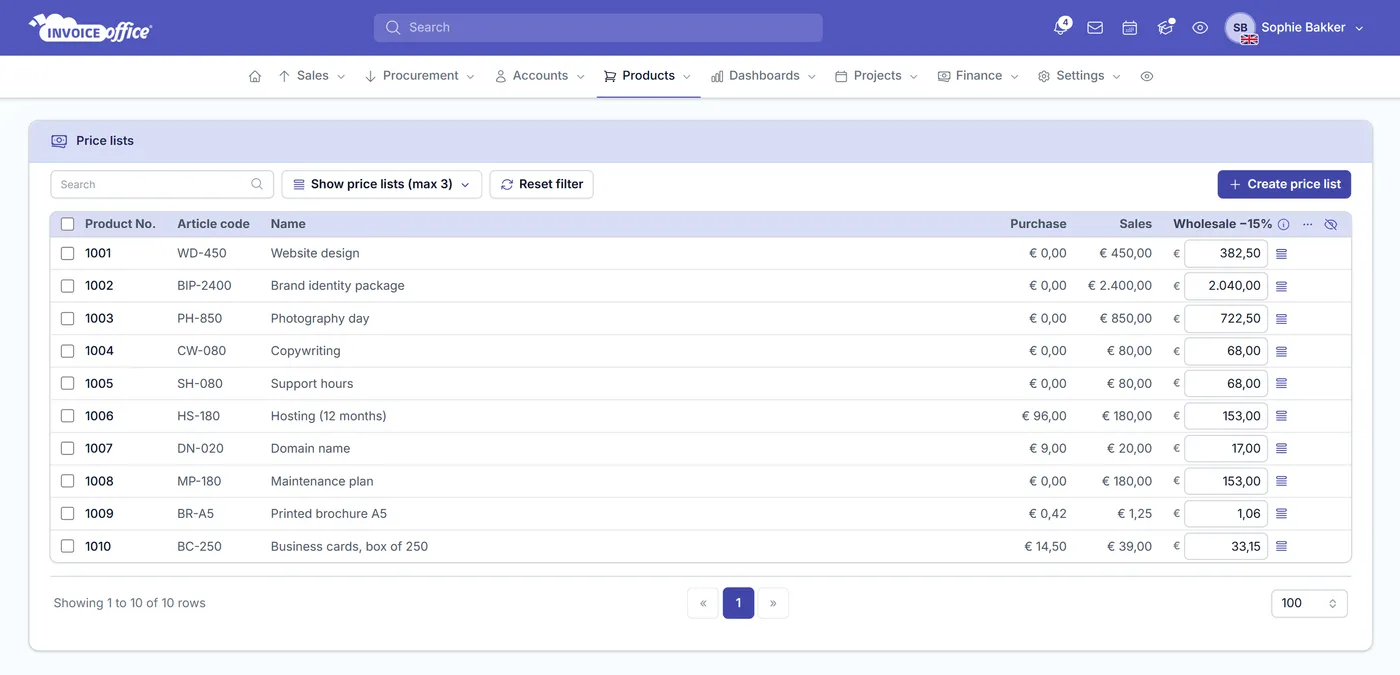
Everything on the price list
Charge each segment properly
Price lists let you run a sophisticated pricing strategy without extra admin: define the pricing once per segment, and the right number lands on the document by itself.
Multiple price lists
Running more than one price list is a fundamental way to manage pricing and cater to different segments, instead of quoting everyone the same number and discounting by hand afterwards.
Customer differentiation
Build segments that match how you actually sell: wholesale versus retail, loyal customers versus new ones, or any split you choose — you decide which customers get which list.
A price list per customer
Connect a price list to a customer on their settings page. Select that customer on a document and their price list is applied — nobody has to remember what was agreed.
Live on the document page
On the invoice or quote create page you can select or change which price list applies to that document, so a one-off arrangement does not mean rebuilding your pricing.
Automatic line prices
Pick a product on a document line and the price list price for that product is set and used automatically. No lookups, no pasting the agreed figure in from somewhere else.
A flexible pricing strategy
Sophisticated pricing is how you increase profit, attract new customers, build loyalty and stay competitive in a market that keeps moving — without repricing everything each time.
Price list settings
Configure each list on its own terms
Set when you create the list, so a wholesale tier, a fixed-price agreement and your standard retail pricing can each behave the way they need to. The prices come from your product records, and the list follows the account you set it on in customer management.
Currency
Set the currency the price list works in, so a segment you sell to abroad is priced in their money rather than converted on the fly every time you quote.
Discount or premium
Apply a discount to the whole list, as a percentage or an amount in the list currency — the simplest way to build a wholesale tier off prices you already have. Enter a negative number and the result is added to the price instead, which is how you build a premium tier.
Lock pricelist price
Switch on Lock pricelist price and the prices on that list stop following the product price — change what a product costs and the locked list stays where it is. That is what lets you promise a customer a price for a fixed period and keep it.
Show always
Switch Show always on and that list is ordered to the top of the price list overview page, so the one you work with constantly is not something you scroll past every time.
How it works
Set the pricing once, in three steps
Step 1Create the price list
Set up a list for the segment you are pricing — wholesale, retail, a loyalty tier — and give it its currency and its discount or premium.
Step 2Connect it to customers
On the customer settings page, connect the price list to the customers it applies to, so the right pricing follows the right accounts.
Step 3Raise the document
Select the customer and their price list is applied. Add products and each line takes its price list price automatically.
Price list questions, answered
What is a product price list?
Why would I use more than one price list?
How do I give a customer their own prices?
Can I set a discount or premium on a price list?
What does Lock pricelist price do?
Can I change the price list on a single document?
Do price lists need a paid plan?
More answers in our FAQ and help center.
Related
Where your price lists apply
Price every segment properly
With our software we make the lives of entrepreneurs easier. Free to start, and 14 days free on every paid plan.