Product groups
Product group management, built into every document
Sell products that belong together as one selectable item. Show the group as a single line with your own total or as every line it contains, see the margin it earns, and raise an invoice straight from the group.
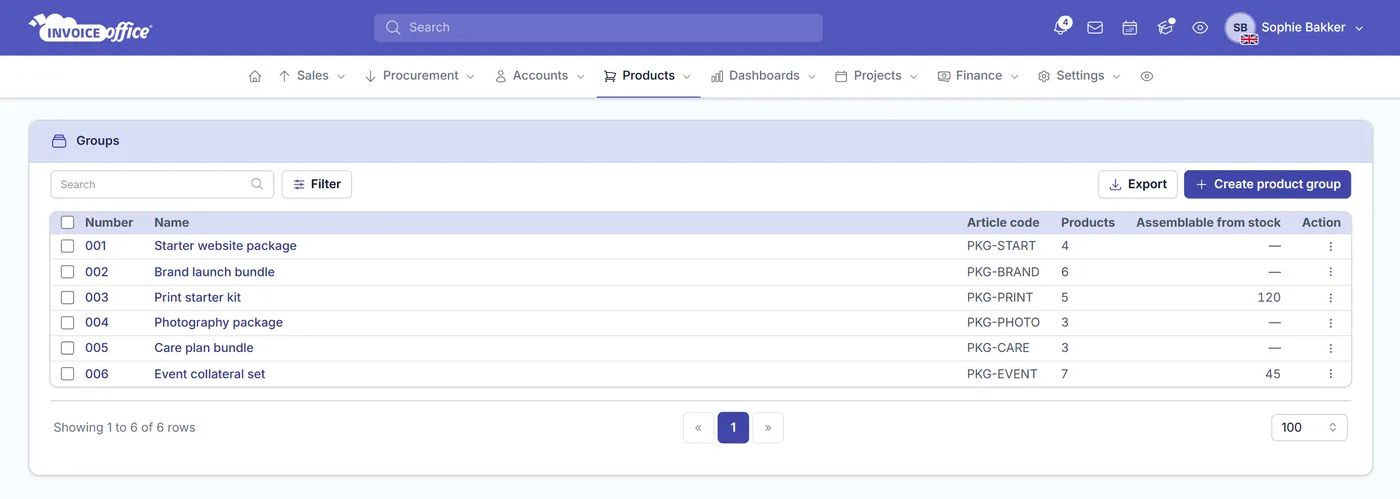
Everything on the group
One selection, the whole set
If you always sell the same products together, selecting them one at a time is wasted effort and a chance to forget one. A product group makes it a single choice.
Find groups on any document
Product groups appear in the product select box on the document pages, where a stack icon and a coloured left border tell a group from a single product at a glance. Search on part of the group name, its article code or its group number. Product groups are part of the Pro license.
Show product group
Switch Show product group on and the document carries the group name instead of separate group lines. Pair it with Total price calculation to set the package price yourself rather than having it calculated from the products inside — which is how you sell a bundle at a bundle price.
Or show every group line
Create a document line for each item in the group instead. The total is the sum of the item prices, with any relevant discounts applied and the applicable taxes added on top.
Profit margin per group
See the profit margin on a product group in both amount and percentage, so you can compare how your groups actually perform financially and adjust the ones that are not earning.
Five documents, straight from the group
The group’s own Action menu creates an invoice, a quote, an order confirmation, a packing note or a credit note, with the group already set on the document line. Billing a standard package is one step, whichever document the customer needs.
Display Columns while you build
The group editor has a Display Columns drawer: turn on Article code, Product name, Product No., Product no. supplier, Quantity, Unit, Sales price, Purchase price, Discount, VAT, VAT amount, Stock quantity or Price total, so you are looking at the figures that matter while you assemble the group.
Why group products
Faster documents, fewer mistakes
Grouping is not just tidiness. It streamlines document creation, keeps product information consistent across every transaction, and gives you a level to measure profitability at that individual products cannot. A group is built from the same records as product management, and the prices it lands on a document still follow the customer's price list.
Manage multiple SKUs at once
A group is one thing to select instead of a dozen. For anything you routinely sell together, that is the difference between one action and twelve.
Nothing missed in order processing
Because the group carries its members with it, every item that belongs in the order is on the order — rather than being remembered, or not, line by line.
Consistent product information
The same group produces the same lines every time, which keeps product information consistent across all your transactions instead of drifting document by document.
Compare group performance
With the margin visible per group in amount and percentage, you can compare grouped products directly and make strategic adjustments while staying profitable.
How it works
From a set of products to a sent invoice
Step 1Build the group
Put the products that belong together into a product group, so the things you always sell as a set are stored as a set.
Step 2Choose how it shows
Decide whether the document shows just the group name with a total you set, or a separate line for every item with the total calculated from them.
Step 3Sell it
Pick the group from the product select box on a quote or invoice, or create an invoice directly from the group with it already on the line.
Product group questions, answered
What is a product group?
How do I find a product group on a document?
Can I show just the group name with a single total?
How is the product group total calculated?
Can I see the profit margin on a product group?
Can I create an invoice directly from a product group?
Do product groups need a paid plan?
More answers in our FAQ and help center.
Related
Where your product groups apply
Sell your sets as one
With our software we make the lives of entrepreneurs easier. Free to start, and 14 days free on every paid plan.