Recurring invoices
Create recurring invoices online
Bill the same customers on repeat without touching a thing. Build the invoice once, attach a schedule that runs anywhere from weekly to yearly, and Invoice Office generates, finalizes and sends each invoice from then on — until the date you tell it to stop.
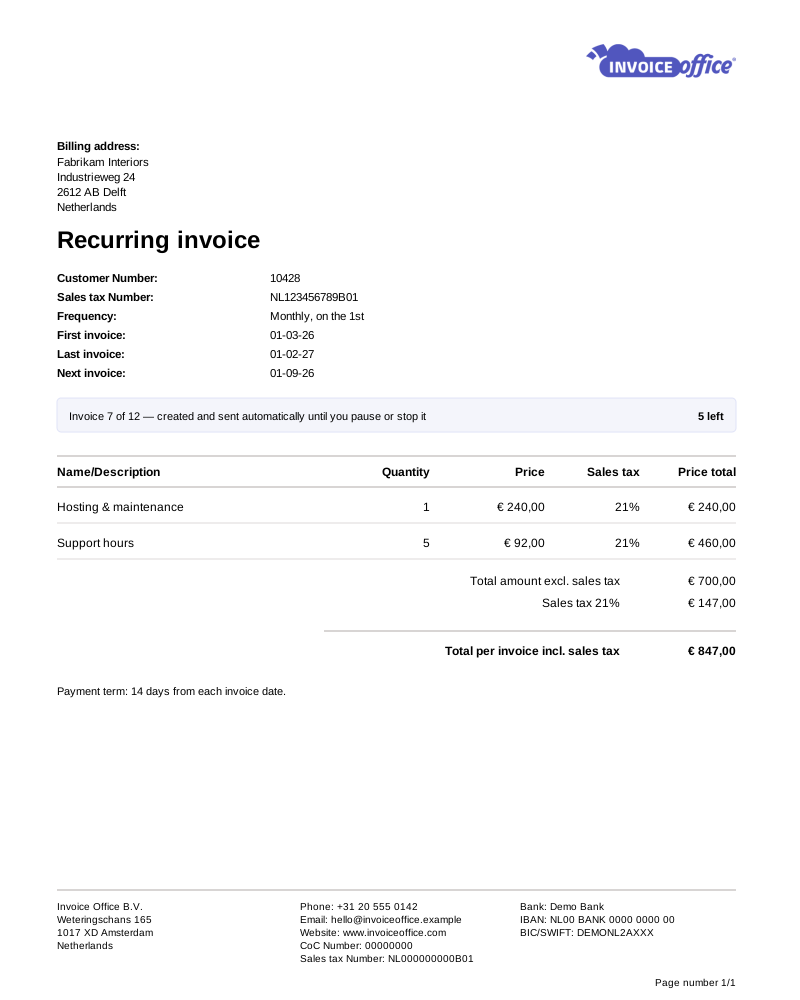
Billing that runs itself
The invoice you only write once
If you send the same customer the same invoice every month, that is not work — it is a reminder you keep having to give yourself. Hand it to a schedule instead.
- Set it once, then forget it
- Build the invoice a single time and attach a schedule. From then on it is generated and sent for you — no diary reminders, no re-keying the same lines every month. Recurring invoices run on a Pro license.
- Nine billing cycles
- Cycle runs Once, Weekly, 2 Weeks, 4 Weeks, Monthly, 2 Months, Quarterly, Half yearly or Yearly — so your invoicing matches your contracts instead of the other way round.
- Latest customer and product info
- Two switches decide how much a generated invoice refreshes. Latest customer info pulls the customer’s current details onto it; Latest product info re-reads your catalog and recalculates the prices. Leave them off and the series keeps billing exactly what you set up.
- Customisable invoice templates
- Recurring does not have to mean generic. Your branding, colours, columns and payment terms apply to every invoice the schedule produces.
- Import lines from Excel
- Setting up a detailed recurring invoice? Fill the import template with a product number and a quantity per line, let the catalog supply the rest, then attach the schedule. Up to 300 lines.
- Multiple languages & currencies
- Bill international clients on repeat in their own language and currency. Both are set per customer, so every invoice in the series comes out right.
Scheduling
Automatic, but never out of your hands
Automation is only worth having if you can change your mind about it. The Cycle, the first invoice date and the last one stay editable on a running series — so a contract change never means a customer gets billed for something they no longer have.
Change the schedule any time
A contract is renegotiated, a project moves, a client changes billing day. Recurring Invoice Schedule on the Action menu reopens Cycle, Send From and Send until on a running series — no rebuilding the invoice behind it.
Send From and Send until
Send From is the first invoice date; Send until is the last. A twelve-month agreement bills twelve times and then stops on its own rather than running until someone notices.
Every invoice traces back
An invoice the schedule produced carries Open recurring invoice and Modify recurring invoice on its Action menu, so you can get from any single invoice to the series that generated it — and change it there.
Built for subscriptions & retainers
Subscription plans, service contracts and monthly retainers are all the same shape: the same amount, the same customer, on a fixed cycle, until the term expires.
How it works
Three steps, then it is off your desk
Step 1Build the invoice once
Pick the customer, pull products and prices from your catalog, and set your payment terms — exactly as you would for any other invoice.
Step 2Attach a schedule
Choose the Cycle, then Send From and Send until, and finalize the recurring invoice — a draft is never sent. That is the whole setup; from here the series runs on its own.
Step 3Invoices send themselves
On each due date the schedule copies the invoice, finalizes it and emails it using your invoice email template. From there it is an ordinary invoice — it can be paid, credited, and chased by automatic reminders.
Recurring invoice questions, answered
What is a recurring invoice?
How often can recurring invoices be sent?
Can I change or stop a recurring invoice?
What happens if my prices or a customer’s details change?
Can a recurring invoice stop on its own?
Which plan do I need for recurring invoices?
Do recurring invoices get payment reminders too?
More answers in our FAQ and help center.
Related
The rest of your sales documents
Stop rewriting the same invoice
Set the schedule once and get your month back. Free to start, no credit card.