100% mobile
Mobile invoicing from any device
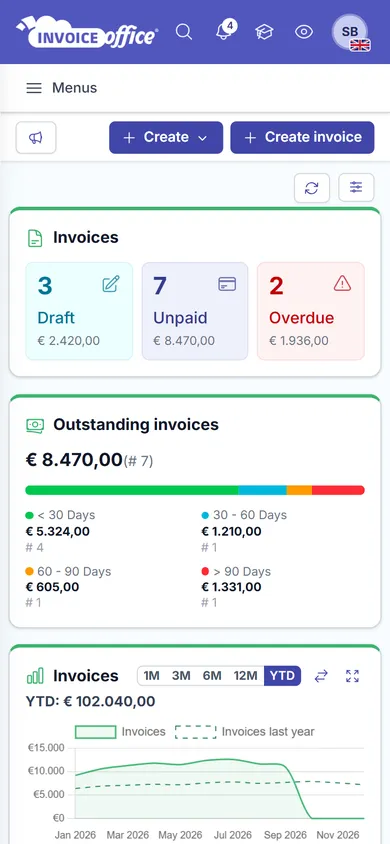
Invoicing should not wait until you are back at the desk. Invoice Office runs in the browser on your phone, tablet or laptop — nothing to install, nothing to update, and the same full application whichever one you pick up.
Free plan available · 14-day trial on paid plans · No credit card
Away from the desk
The office fits in your pocket
The jobs that used to wait for you to get back — logging the hours, filing the receipt, sending the invoice — are the ones worth doing on the spot, while you still remember them.
- To install
- NothingTo install
- On any OS
- Any browserOn any OS
- Every device
- One loginEvery device
- Nothing to install, nothing to update
- Invoice Office runs in the browser you already have. No app store, no download, no version to keep current — open it on a phone, a tablet or a laptop and you are working.
- One environment, every device
- Your work lives in your account, not on a device. Start a quote on the laptop and finish it on the train — there is no syncing to go wrong, because there is nothing to sync.
- Start and stop timers on the spot
- Timesheet rows have their own start/stop timer. Log hours where the work happens instead of reconstructing the week from memory on Friday afternoon.
- Receipts straight off your phone
- Photograph a receipt and attach it to a purchase without going back to the office. Images and PDFs both upload, so whatever the supplier handed you goes in the books.
- Send the invoice before you leave
- Creating, finalising and emailing a document works the same on a small screen as on a large one — so the invoice can go out while the job is still fresh.
- Your customer is mobile too
- A quote can be opened, approved and signed by the customer in their own browser, on their own phone, with no account and nothing to install on their side either.
What that means
A browser, not a download
Plenty of software promises to be mobile and means a thin app with a fraction of the features. Invoice Office takes the other route: one web application that fits whatever screen you open it on. Here is exactly what that gives you, and what it does not.
It is the web app, not a cut-down one
You are not using a stripped mobile edition with half the menu missing. It is the same application, the same data and the same features, laid out to fit the screen you opened it on.
Online, not offline
Invoice Office is an online application, so it needs a connection — on the road, at a client, on holiday, anywhere you have one. It is not built to keep working in a tunnel and sync up later.
Any browser, any operating system
Windows, macOS, Android or iOS; whichever browser you prefer. There is no plugin to add and no supported-device list to check before you buy a laptop.
Alerts in the app and by email
Notifications collect in your account and important events reach you by email, so you stay informed on whatever device you next pick up.
How it works
There is no setup
Step 1Open your browser
On the phone in your pocket or the laptop in your bag. Add a shortcut to your home screen if you would rather not type the address.
Step 2Log in
One account, no per-device setup and no licence to move across when you replace a phone.
Step 3Carry on where you left off
Everything is exactly as you left it, because it never lived on the other device in the first place.
Mobile invoicing questions, answered
Is there a mobile app to download?
Does Invoice Office work offline?
Which devices and operating systems are supported?
Can I track time from my phone?
Can I photograph a receipt and add it to my administration?
Can my customer approve a quote on their phone?
More answers in our FAQ and help center.
Related
What people most often do on the move
Open it on the device you are holding
No download, no setup, no licence to move. Free to start, and no credit card to try it.