Customer management
Customer management software in one dashboard
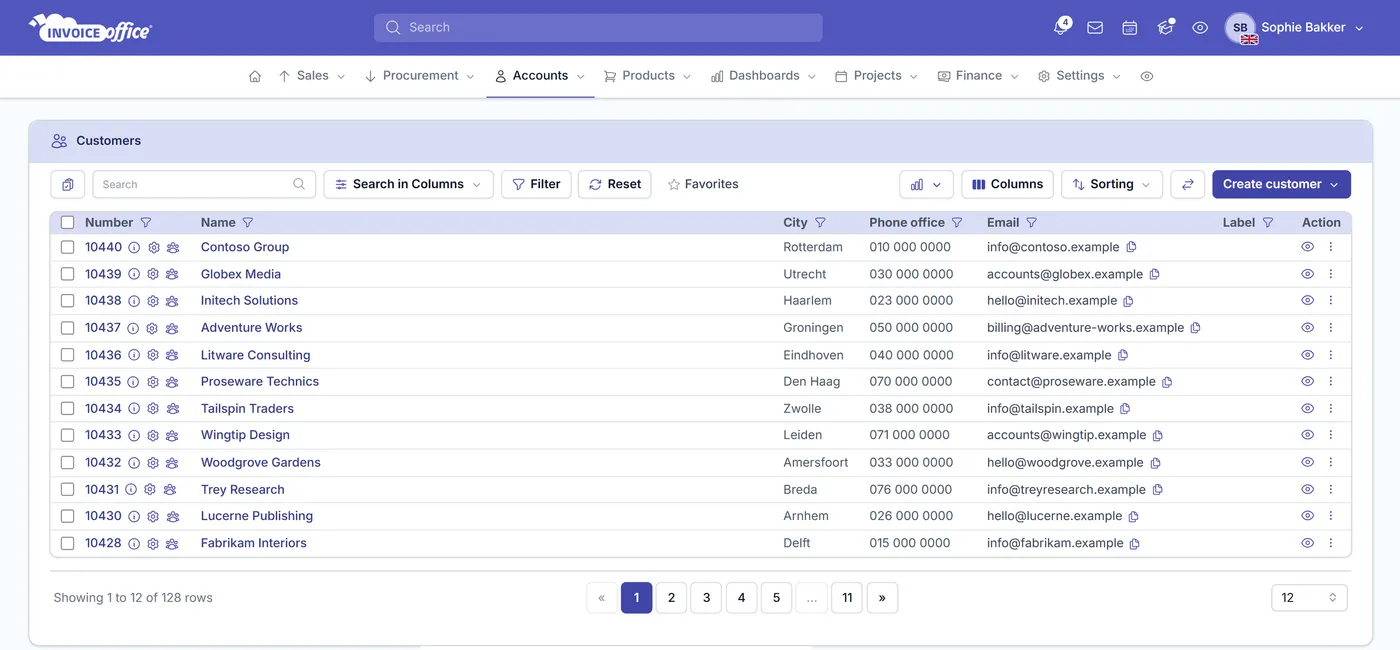
Customer management software built into the system you invoice from. Invoice Office gives every customer a single source of truth — information, settings, addresses, contact persons, documents, payments, logged contact and attachments — so you always know where the account stands.
Everything on the customer
A 360-degree view of every customer
Everything you know about an account in one place — what you sent them, what they paid, what is still open and what was last said. If a company sits on both sides of your books, the same record does supplier management too.
Centralized customer dashboard
One dashboard per customer covers invoices, quotes, credit notes, reminders, payments, documents, tasks, notes and projects, with invoice and DSO charts and a location map — over whatever date range you pick, from this month to year to date to your own from and to dates.
The whole customer record
CoC number, VAT number, Peppol identifier, bank account and BIC, industry, legal form, lead source and number of employees. An Is also supplier flag covers the companies you both sell to and buy from, so they stay one account.
Bill here, deliver there
The Billing address is what prints on the invoice; Shipping Address entries are where the goods actually go on a packing note. Add as many shipping and Other addresses as the customer has branches, and control per address whether the country prints at all — and in which language it is translated.
The right person per document
Add every contact you deal with using Create Contact, or bring a whole list in with Import Contact person. Pair them with per-document send-to addresses so invoices reach accounts payable while quotes go to the person who actually asked for one.
Chase without leaving the record
Relation management turns the customer into a CRM: log the call about an overdue invoice, the email chasing an open quote, a WhatsApp, LinkedIn message, SMS or meeting — with notes, tasks and attachments beside them, so whoever picks the account up next can see what was already said.
Documents, open items & payments
Every invoice, quote, packing note, order confirmation, credit note and payment reminder you sent, the payments registered against them, and an Open items list showing amount, paid and amount due per document — with a customer statement you can preview or download.
Customer settings
Configure a customer once
Every customer can be configured with their own settings. Select them on an invoice or a quote and the right currency, VAT code, price list, document design, terms and document language are already applied — nobody has to remember what was agreed with whom.
Currency, VAT code & profit account
Set the currency code, VAT code and profit account on the customer, so the right values are applied the moment you select them on a document — and the language the document is written in.
Default email address per document type
Invoices to accounts payable, quotes to your contact, reminders somewhere else again — set the default send-to address and name separately for invoices, quotes, credit notes, packing notes, order confirmations and payment reminders.
Price list per customer
Set the price list that should be applied on the invoice or quote page when this customer is selected, so agreed pricing is used without anyone having to remember it. Applying a price list to documents is part of the Pro license.
Designs, terms & numbering
Pick the document design and email template per document type, set document terms and payment terms for invoices, order confirmations and quotes, and document reminders for invoices and quotes — then give this customer their own sequence numbers, right down to proforma invoices.
How it works
From new contact to loyal customer
Step 1Add the customer
Under Accounts → Customers, use Create customer for a company or Create individual customer for an individual — or import a whole list with the six-step wizard: source, upload, map fields, preview, import, done. Then add their addresses and contact persons.
Step 2Set their defaults
Configure currency, VAT code, profit account, price list, document design, email template, terms and sequence numbers once. Every document to this customer then picks them up on its own.
Step 3Sell, bill and follow up
Raise an invoice, quote, packing note, order confirmation or credit note straight from the customer’s Action menu. Documents, payments, logged conversations and open items all collect on the customer.
Customer management questions, answered
What is customer management software?
Can one record be both a customer and a supplier?
Can I invoice one address and deliver to another?
How do I add contact persons to a customer?
Can I set a different price list or currency per customer?
Where do I log a call chasing an unpaid invoice?
Do customer tasks sync with my calendar?
Step-by-step guides: create a new customer, import customers, suppliers and products, manage customer addresses, set up the customer portal, create a customer account statement and choose a design template for one customer.
More answers in our FAQ and help center.
Related
What your customer records feed into
Start invoicing from a customer record
Add your customers, set their defaults once, and send the first invoice from the account itself. Free to start, and 14 days free on every paid plan.