Order confirmations
Create order confirmations online
Put every order in writing before you start work — branded, in your customer’s language, and raised automatically by your webshop if you sell online. Then convert it into an invoice, packing note or proforma in a single click.
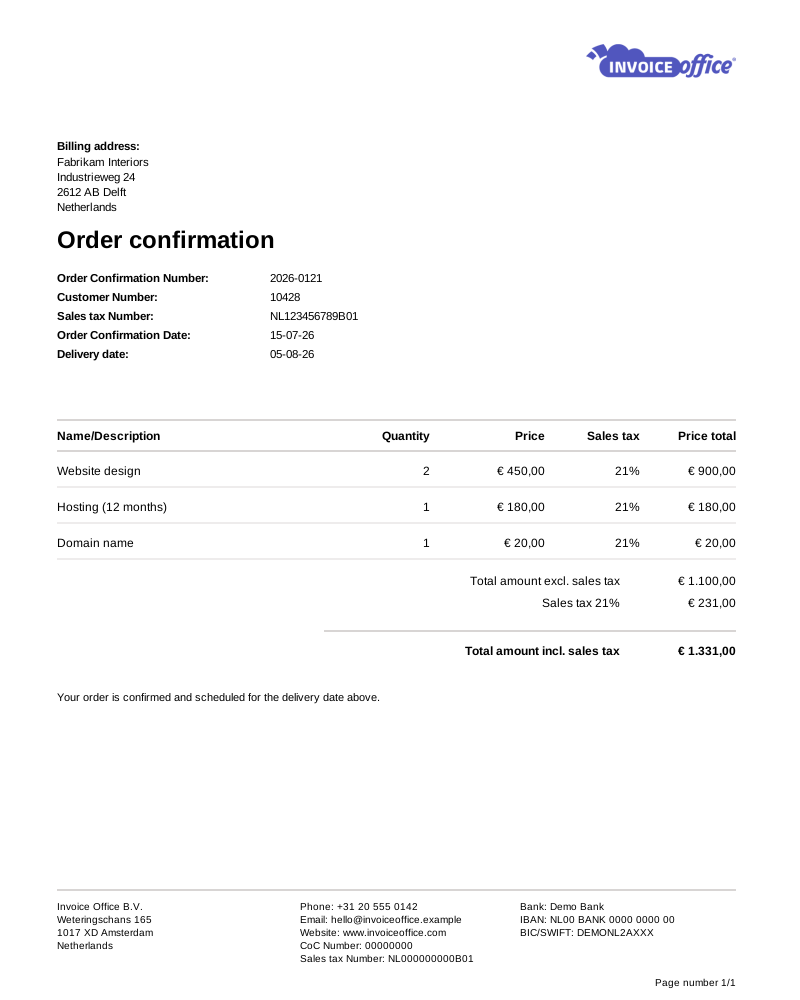
Everything on the order confirmation
Agree it once, use it everywhere
The confirmation is the version of the order both sides agree on. Everything downstream — the packing note, the invoice, the proforma — should come from it, not from someone retyping it.
- Convert it onward in one click
- A confirmed order becomes an invoice, a packing note for the warehouse, a proforma invoice, a quote or even a purchase order to your own supplier — carrying the same lines and prices, with nothing retyped.
- It reserves the stock
- With backorders switched on, confirming an order reserves the goods rather than consuming them — anything you cannot cover is split into backorder, and stock is allocated oldest order first as it comes in. The goods only leave on delivery.
- E-commerce integration
- Connect a webshop like WooCommerce or Shopify and an order confirmation is created the moment an order comes in — as a draft or already finalized, whichever you choose — so no one has to key the order in a second time.
- Customisable templates
- Set the layout, logo, colours and custom fields once. Whether you want a minimal confirmation or a detailed one, every order goes out looking like it came from the same business.
- Import order lines from Excel
- Large orders do not need typing out line by line. Fill the import template with a product number and a quantity per line, and the descriptions, prices and VAT come from your catalog. Up to 300 lines, on a Pro license.
- Multiple languages & currencies
- Confirm an order in the customer’s own language and currency. Set both per customer and the document and its totals follow — so selling across a border adds no extra admin.
- Add document texts
- Include an introduction, delivery and payment terms, closing notes, or internal remarks only your team sees — and set defaults so you are not rewriting them every order.
Amounts & totals
State the exact deal you agreed
A confirmation that is vague about discounts or totals is what an argument looks like three weeks later. Shape the whole bottom half of the document so the numbers are unambiguous before anything ships.
Text lines & subtotal sections
Add free text lines for terms or product detail, and group the order into sections with their own subtotals — so a long confirmation stays readable and easy to approve.
Custom total labels
Rename the totals row to your business’s own terminology, in the language of the document, so the confirmation reads the way your customers expect it to.
Configure grand total fields
Add or remove the fields shown beneath the lines — net, VAT per rate, discount, shipping, deposit and advance payment — and lay the totals out the way your business actually works.
Advanced discount & amount options
Apply a discount to a single line or across the grand total, and make the custom adjustments a deal needs — so the confirmation states the exact offer you agreed.
How it works
From order to shipped in three steps
Step 1The order comes in
From an accepted quote, from your webshop, or entered by hand — pull the products and prices straight from your catalog and customer record.
Step 2Confirm it in writing
Send a branded order confirmation with the agreed lines, discounts, delivery and payment terms, so both sides have the same version of what was ordered.
Step 3Ship it and bill it
Convert the confirmation into a packing note for the warehouse and an invoice for the customer — the same data flowing through, one click each. Short on stock? The shortfall is held as a backorder until it arrives.
Order confirmation questions, answered
What is an order confirmation?
What is the difference between a quote and an order confirmation?
Can I turn an order confirmation into an invoice?
Can my webshop send order confirmations automatically?
Can I confirm orders in another language or currency?
Can I show discounts on the confirmation?
More answers in our FAQ and help center.
Related
The documents on either side of an order
Less administration, more sales
Confirm, ship and bill from one document. Free to start, no credit card.