REST API
Invoicing API for your own software
The Invoice Office invoicing API is a REST API that connects your webshop, CRM or ERP to your invoicing. Create invoices, quotes and credit notes, keep customers and products in sync, and log CRM activities — all over HTTPS in JSON, with an open, documented API reference.
Docs open to everyone · API included in the Pro license · Free trial
What you can connect
What the invoicing API covers
The API works on the same records you see in the app — so a document created through the API is an ordinary invoice, quote or packing note in your account.
- Documented API
- REST + OpenAPI 3.1Documented API
- Response formats
- JSON, XML, CSVResponse formats
- Authentication
- API key or JWTAuthentication
- Invoices and sales documents
- A REST API for invoices and sales documents: list, create, update and delete invoices, quotes, order confirmations, credit notes, proforma invoices and packing notes. Recurring invoices and payment reminders can be read.
- Customers and suppliers
- Keep your customer and supplier records in sync with your CRM, webshop or ERP: create, update and delete accounts, and read their contact persons.
- Products, stock and price lists
- Create and update products, and read stock levels, stock mutations, price lists, product suppliers, dimensions and specifications.
- Purchases and purchase orders
- Push supplier costs in as purchases, create purchase orders, and read your recurring purchases.
- CRM activities
- Log calls, e-mails, meetings, notes, SMS, WhatsApp and LinkedIn messages against your customers, so every contact moment lands in one place.
- Convert one document into another
- Works like creating one document from another in the app: turn a quote into an order confirmation or invoice, an invoice into a packing note or credit note. Lines, customer and addresses are copied over.
API documentation
Read the API documentation before you sign up
The API reference is public — no account needed. Your developer can check every endpoint, field and response before you decide, and come back to the same page while building.
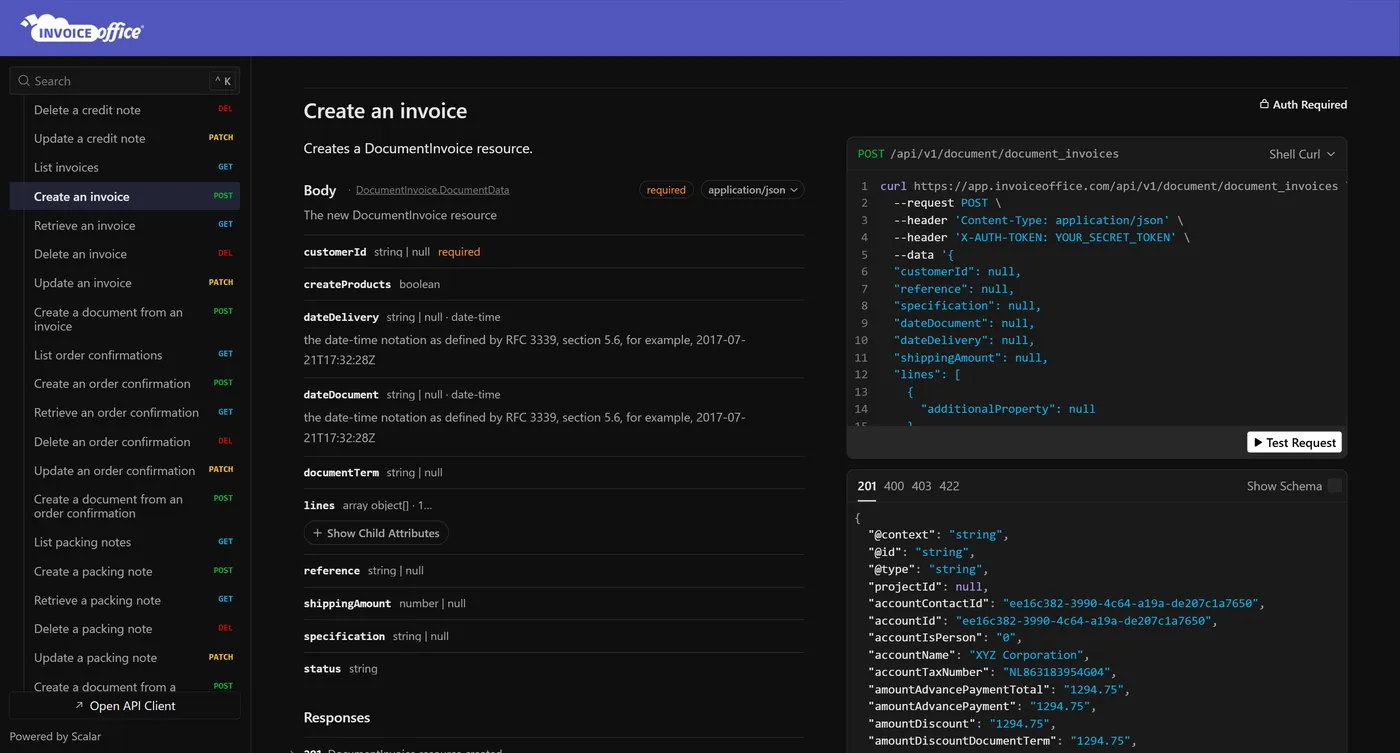
Open, interactive API reference
Every endpoint is documented with its parameters, request body and response schema. Search the reference, open the API client, or download the OpenAPI document to generate a client in your own language.
Two ways to authenticate
Send your API secret in the X-AUTH-TOKEN header on each request, or exchange an e-mail address and password for a JWT at the Login Check endpoint and send it as a Bearer token.
The formats your system speaks
Responses come as JSON, JSON-LD, XML, CSV or YAML. Updates use JSON merge patch, so you only send the fields that change.
Filter and page through results
List endpoints are paginated with the _page parameter. Invoices can be filtered by document number and by document, delivery, payment or creation date ranges.
Integrations
What teams build with the API
- Invoice orders from your webshop
- Create the customer if they are new, then create the invoice with its lines — set createProducts and missing products are created for you as it goes.
- Sync your CRM
- Keep customers in one system of record and push changes to Invoice Office, with calls, meetings and notes logged as CRM activities.
- Feed your own dashboards
- Pull invoices, purchases and stock into a data warehouse, spreadsheet or BI tool on your own schedule, in JSON or CSV.
- Automate the paperwork
- When an order ships, convert its order confirmation into a packing note and an invoice from your own system — no copying between screens.
Getting started
Your first API call in three steps
Step 1:Switch on the Pro license
The REST API is part of the Pro license. Start a free trial, or buy Pro under Settings › Licenses.
Step 2:Create your API key and secret
Go to Settings › Security center › API key and secret, click Create, name the key and click Generate secret key. Your Client Id and Secret appear in the key list — treat the secret like a password.
Step 3:Make your first call
Send the secret in the X-AUTH-TOKEN header — for example to list your customers — and follow the API reference from there.
Invoicing API questions, answered
Does Invoice Office have an invoice API?
Where is the API documentation?
Which plan includes the API?
How do I authenticate with the API?
Can I create invoices through the API?
Which data formats does the API support?
Is there an OpenAPI (Swagger) specification?
More answers in our FAQ and help center.
Related
The records the API works with
Connect your software to Invoice Office
Browse the API reference, then start a free trial and create your API key. No credit card needed to try it.