To change a VAT rate in Invoice Office, you don’t create a new VAT code. You add a new percentage to the existing code, with the date it starts. The code keeps its history, so earlier rates stay on record and your products, customers and documents keep pointing at the same code.
Add the new percentage
- Go to Settings → VAT codes.
- Open the code from its Action menu.
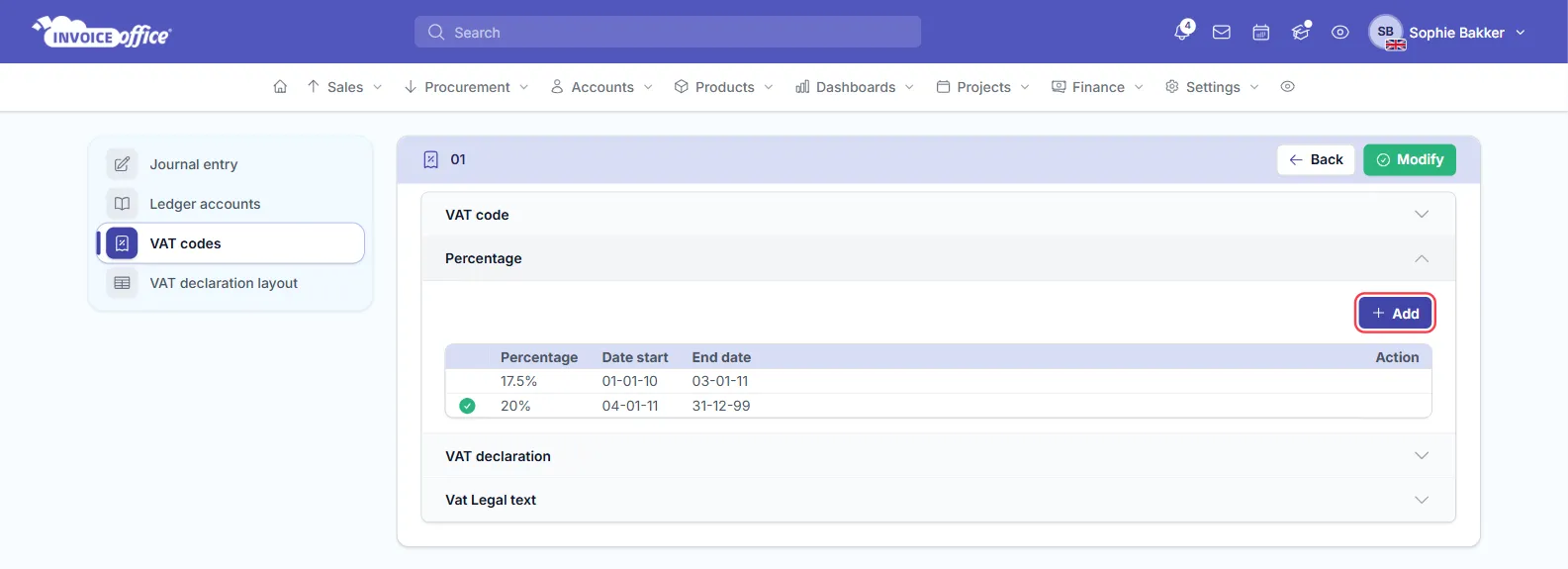
- Open the Percentage section. It lists each rate with its Percentage, Date start and End date.
- Click Add.
- Enter the Date start (the first day of the new rate), an End date if you know one, and the new rate under VAT country percentage.
- Click Save.
Add it on the day it starts
The VAT code switches to the new rate when you save it, as long as its Date start has been reached. A rate you add in advance is listed, but the code doesn’t switch over by itself when the date arrives. Add the new rate on the day it starts, or after it. If you added it in advance, open it with its edit (pencil) icon on or after the start date and click Save to switch the code over.
Which rate is in use
The rate in force today has a green check at the start of its row: its Date start has been reached and its End date is empty or later than today.
Edit or remove a rate
Rates you added yourself have an edit (pencil) and a delete (bin) icon on their row. The rates that come with Invoice Office have neither: you can’t change or remove them, only add a new rate next to them.