Wondering why your documents have a Draft/concept in the background? Nothing has gone wrong. When you save a document it goes into Draft mode, which simply means it is not finalised yet and you can still make changes to it.
What a concept is
A concept is a saved but unfinished document. It can still be edited freely, and the watermark is deliberate — it stops an unfinished document being mistaken for a real one. The document’s status badge reads Draft while it is in this state.
Make the watermark go away
Finalise the document: open the green Finalize button in the top right of the document and pick how you want to finalise it.
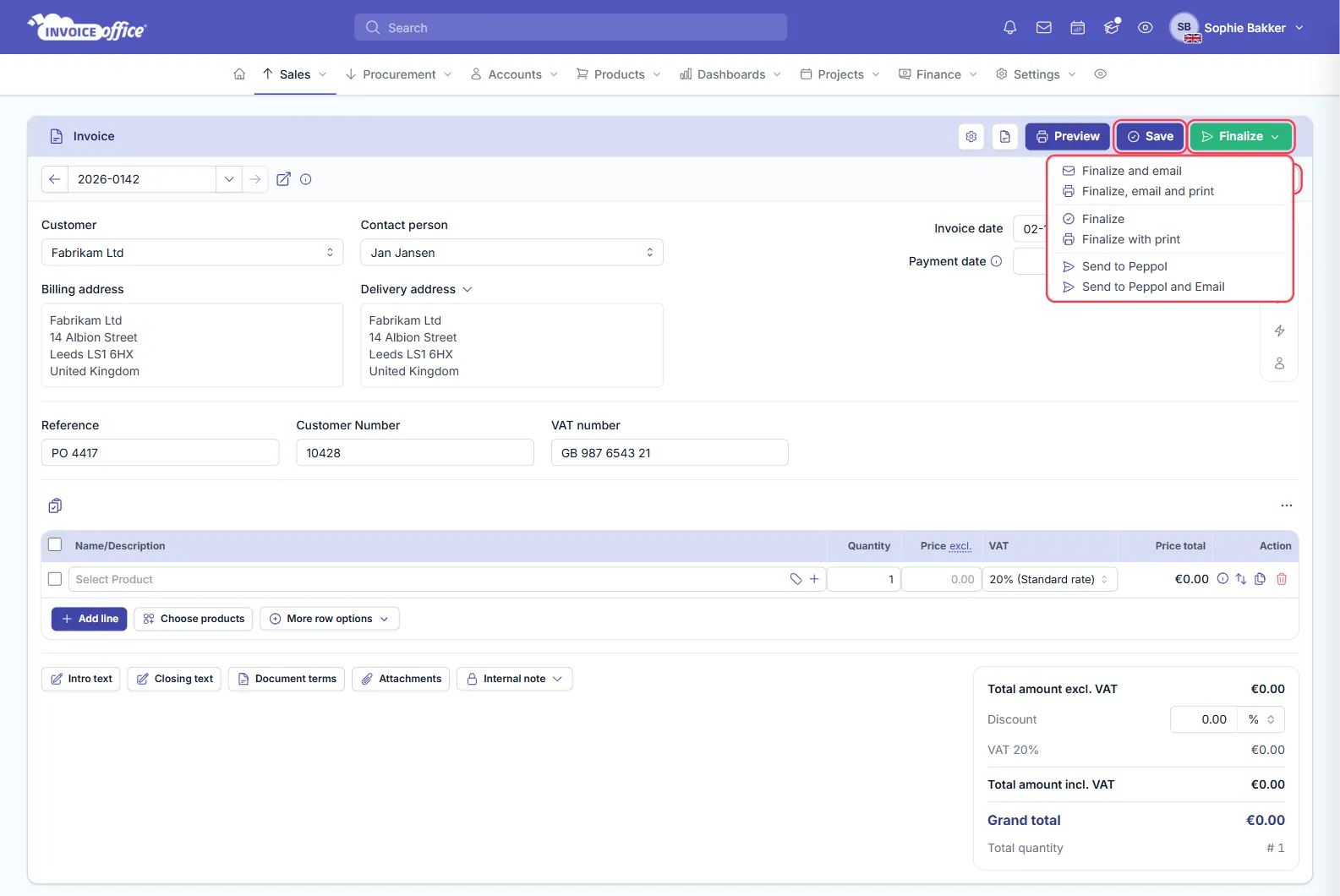
The menu holds six options, and all of them finalise the document, so any of them clears the watermark:
- Finalize — finalise and nothing else.
- Finalize with print — finalise and open the print dialog.
- Finalize and email — finalise and send it to the customer.
- Finalize, email and print — all three.
- Send to Peppol and Send to Peppol and Email — finalise and deliver over the Peppol network.
See Create an invoice for what each one does in practice.
Once the document is finalised you can no longer modify it, and the watermark is gone.
Why you cannot edit a finalised document
That is the point of finalising. It saves you from changing a document by mistake after it has already gone to the customer — the copy in your account stays the same as the copy they received.
If something does need to change after finalising, correct it with a credit note rather than editing the original.
Contact us for any further queries — see Contact us.