There are two ways to change your Invoice Office password: reset it from the login screen if you cannot get in, or change it from the Security center if you are already logged in.
Reset a forgotten password
- Go to the login screen and choose Forgot password.
- Enter the email address your account is registered with and click Reset password.
- Invoice Office emails you a link. Open it and create your new password.

The email carries a link, not a password — so nothing usable is ever sent in plain text, and the link is what lets you set the new password yourself.
Change your password from inside your account
Use this when you know your current password.
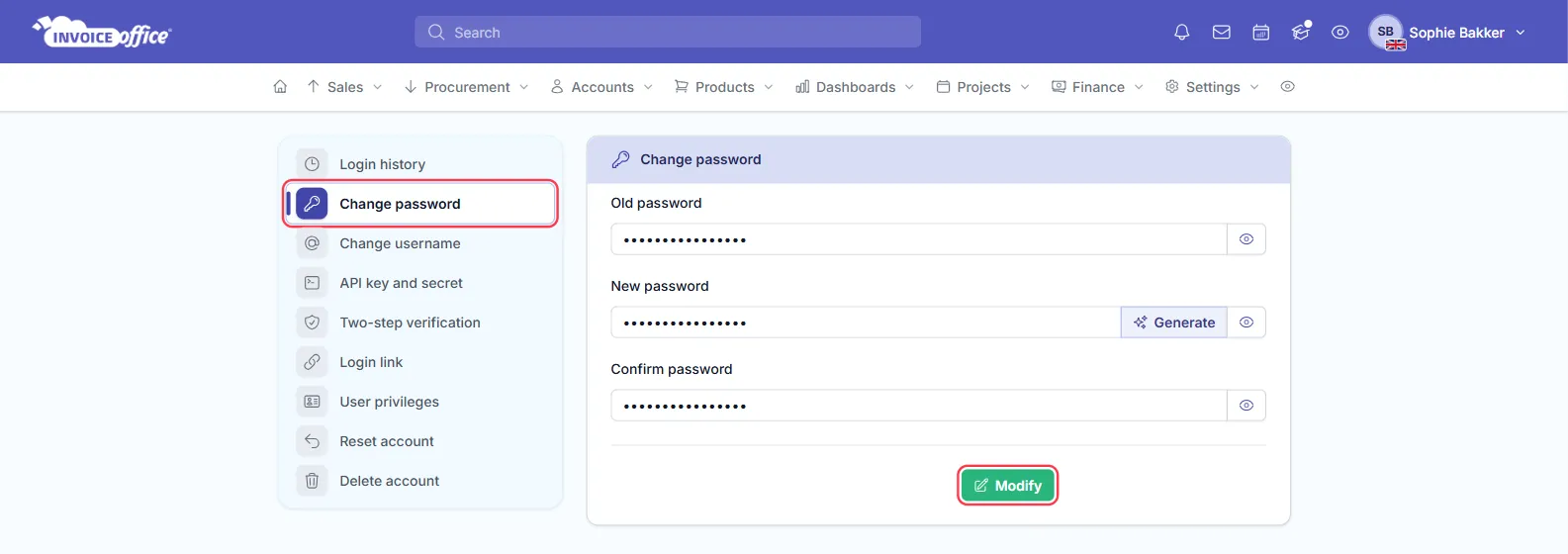
- Open Settings → Security center → Change password.
- Enter your Old password.
- Enter the new one in New password, or click Generate to have Invoice Office create a random password for you, then repeat it under Confirm password.
- Click Modify. Invoice Office confirms the change with a verification code — enter it and choose Approve, or use Resend code if it has not arrived.
Worth doing periodically, and immediately if you think someone else has had access to your account.
The rest of the Security center sits in the same menu: Login history, Change username, API key and secret, Two-step verification, Login link, User privileges, Reset account and Delete account.
The email has not arrived
- Check your spam folder. Password emails often land there.
- Check the address. It must be the address your account was created with. If you have several addresses, try the other one.
- Give it a minute. Delivery is usually quick but not always instant.
- Still nothing? Contact us and we will check the account.
If a colleague is locked out
Anyone with user management rights can help — see How to create and manage your users. You do not need to share passwords; give the person their own login instead.