For Intrastat and EC Sales List reporting, Invoice Office gives you the figures, and you file the declarations with your tax or statistics authority. Your sales to EU business customers come together in one box of your VAT declaration, and you can export them to Excel. The customer list shows each customer’s country and VAT number. This guide explains what Intrastat and EC Sales Lists are and who needs them, how to find your EU transactions per country, and how to export the data for your declaration.
What Intrastat and EC Sales Lists are and who needs them
An EC Sales List reports your sales of goods and services to business customers in other EU countries: per customer, their VAT number and the total amount for the period. It lets tax authorities check that your customer declares the reverse-charge VAT. Some examples:
- Netherlands (opgaaf intracommunautaire prestaties, ICP): you file it next to your VAT return when you supply goods or services to customers in other EU countries who gave you their VAT number. It’s quarterly, or monthly once your goods supplies to other EU countries pass €50,000 in a quarter. You file it through Mijn Belastingdienst Zakelijk (Belastingdienst).
- United Kingdom: only businesses that sell goods from Northern Ireland to VAT-registered EU customers still file an EC Sales List. It’s due within 21 days of the period (GOV.UK).
An Intrastat declaration is a statistical report of goods (not services) moving between EU countries, collected by the national statistics or customs authority. You only file it once your EU trade in goods passes your country’s threshold. In Ireland, for example, that’s €750,000 a year in dispatches. It asks for details per product line: the 8-digit commodity code (Combined Nomenclature), the value, the net mass and the nature of the transaction (Revenue Intrastat manual).
Rules, thresholds and deadlines differ per country, so check them with your tax authority or accountant.
What Invoice Office does and doesn’t do
Invoice Office has no Intrastat or EC Sales List feature. It doesn’t make these declarations and doesn’t send them. What it gives you:
- Your EU business sales in one place. Invoices that use your EU reverse-charge VAT code are counted in one box of your VAT declaration. You can open the invoices behind that box and export them.
- Country and VAT number per customer. The customer list can show both, and you can sort and filter on them.
Invoices only end up in that box if they use the reverse charge. See how to set up the VAT reverse charge. The automatic reverse charge looks at the customer’s country, not at their VAT number, so the box can also hold EU customers without a VAT number. Leave those out of your EC Sales List.
Step 1: Open the EU sales box of your VAT declaration
- Go to Finance → Reports → VAT declaration.
- Choose the period of your declaration, for example Last quarter.
- Find the box your EU reverse-charge VAT code is linked to. You can check this under Settings → VAT declaration layout (under Finance) or on the VAT code itself. In the Dutch layout it’s 3b, supplies to or services in other EU countries.
- Click the magnifier next to the box.
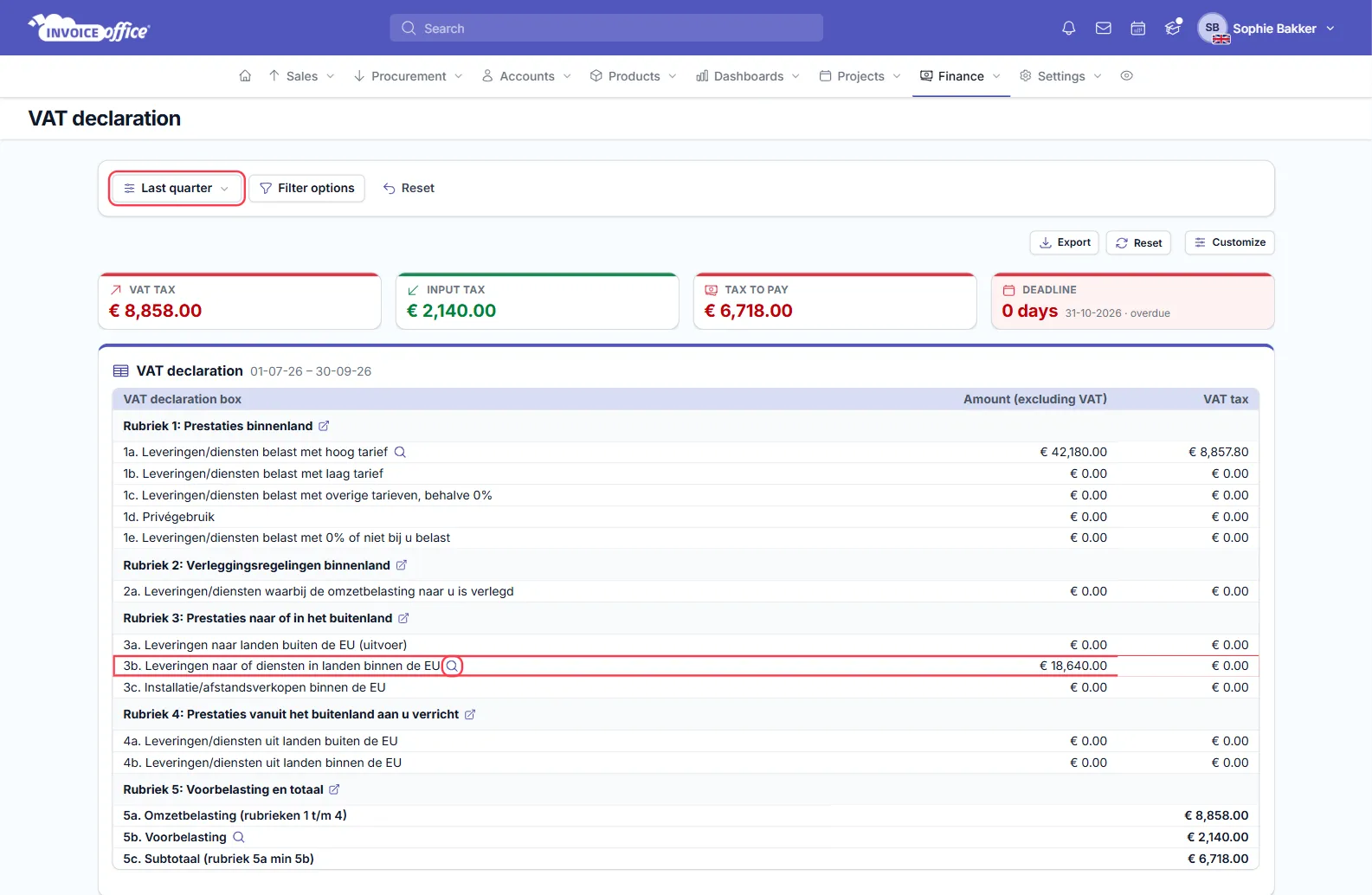
The amount next to the box is your total EU sales for the period. On an EC Sales List, that total is split per customer. More about the report in how to use the VAT dashboard and VAT return.
Step 2: Check the period and export the invoices
The Documents page lists the bookings behind the box, with Date, Ledger account, Ledger account code, Document, Document number, Account (the customer), Debit and Credit. To look at one customer, type their name in Search.
From date and To date open one day later than the period you chose in the report, and changing them doesn’t change the list. So the list can miss bookings from the first day of your period and show bookings from the day after it. Use the export to work with your exact period:
- Click Export and choose Excel (or CSV or PDF).
- In the file, filter the Date column on your period and delete the other rows. The export holds all bookings for this box, from every period, and its last row is a total of everything in it, so delete that row too.
- Add up the amounts per customer (Account). That gives you the total per customer for your EC Sales List. In the file, sales show as negative amounts.
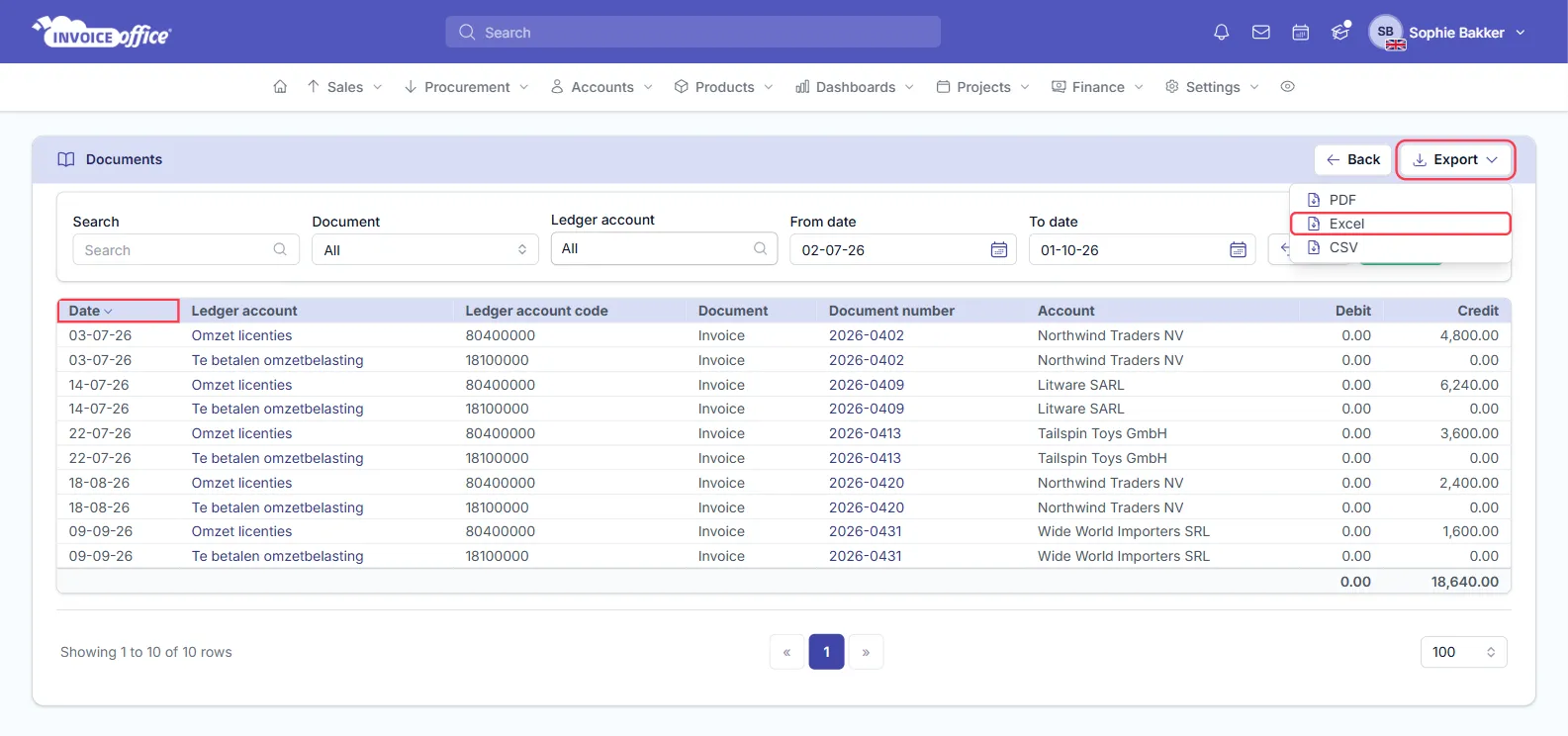
How to read the list:
- Each invoice line has a sales line with the amount and a VAT line of 0.00, because no VAT is charged under the reverse charge.
- Products you keep in stock can add cost-of-goods and stock lines too. Leave those out of your totals: count only the sales lines.
- Invoices show under Credit, credit notes under Debit.
Step 3: Add each customer’s country and VAT number
An EC Sales List needs each customer’s VAT number, and Intrastat needs the partner country. Both are in your customer list.
- Go to Accounts → Customers.
- Click Columns. Under Customer, add VAT number. Under Address, add Country. Click Save.
- Click the Country column header to sort by country, or use the filter icon in the header to show one country.
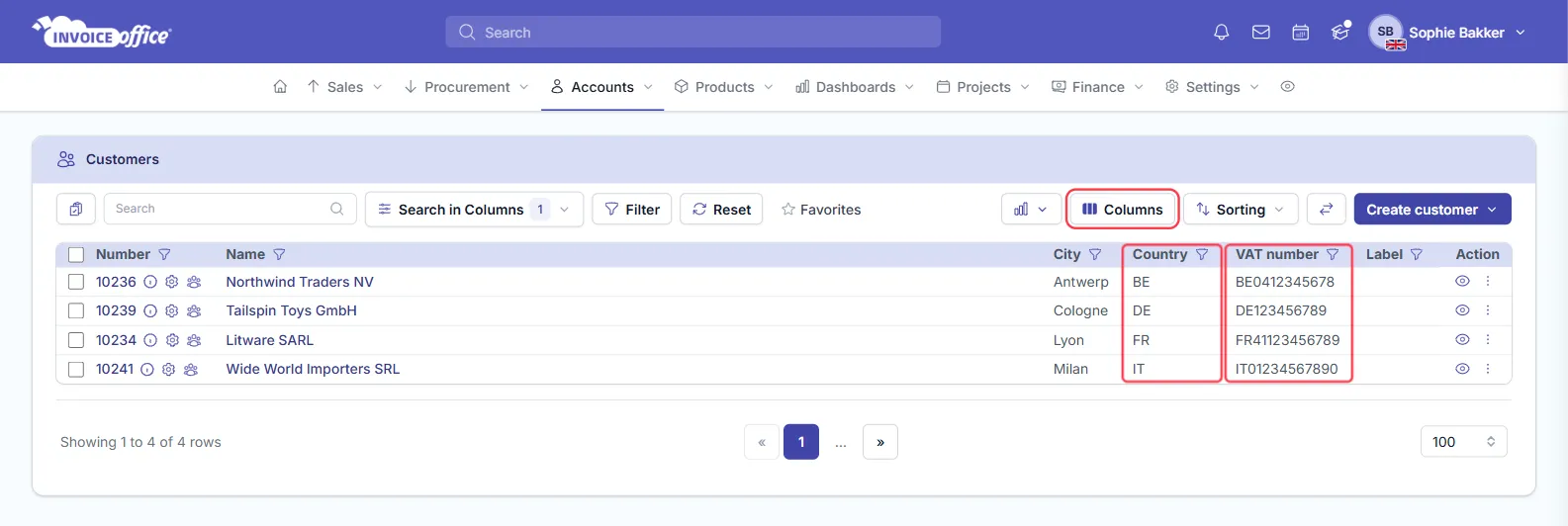
Copy the country and VAT number next to each customer’s total in your spreadsheet. Customers with an empty VAT number don’t go on the EC Sales List. An EU VAT number
starts with the country code, such as DE for Germany. Check numbers you’re not sure about in the EU
VIES database. Then enter the list in your tax
authority’s portal.
Intrastat: what you can take from Invoice Office
For Intrastat you report goods, not services, per commodity code. From Invoice Office you can use:
- the invoices and amounts per customer and country from steps 2 and 3. Leave out the lines for services;
- the weight of your products: open a product and look under Dimensions, field Weight.
Invoice Office doesn’t hold commodity codes, the nature of the transaction, delivery terms or mode of transport, and doesn’t add up quantities per commodity code. Keep those details with your product data or ask your accountant or forwarder, and file the Intrastat declaration on your statistics or customs authority’s portal.
Common questions
Can I filter invoices by country in Invoice Office? Not in the invoice list. Use the EU sales box of the VAT declaration for your EU business sales, and the Country column in the customer list to see which country each customer is in.
Do sales to private customers in other EU countries go on the EC Sales List? No. The EC Sales List is for business customers with a VAT number. For sales to consumers, see how to set up One Stop Shop (OSS) VAT.
Can Invoice Office file the EC Sales List for me? No. You or your accountant file it on your tax authority’s portal.