A footer and a sign-off are the professional way to close a document. In Invoice Office both are blocks in your document design:
- The footer — your company details at the bottom of every page — is the Company details block.
- The sign-off — “Kind regards, …”, payment instructions, a scanned signature — goes in the Closing text, Document terms & conditions, Custom text or Custom image block.
Set the footer
- Go to Settings → Documents → Document designs, pick the language and open the design.
- In the Blocks tab, switch Company details on and click its gear icon.
- On the Content tab, fill in Footer text 1 to Footer text 4. For each text, Show in decides whether it prints in the Header or the Footer.
- Click Save.
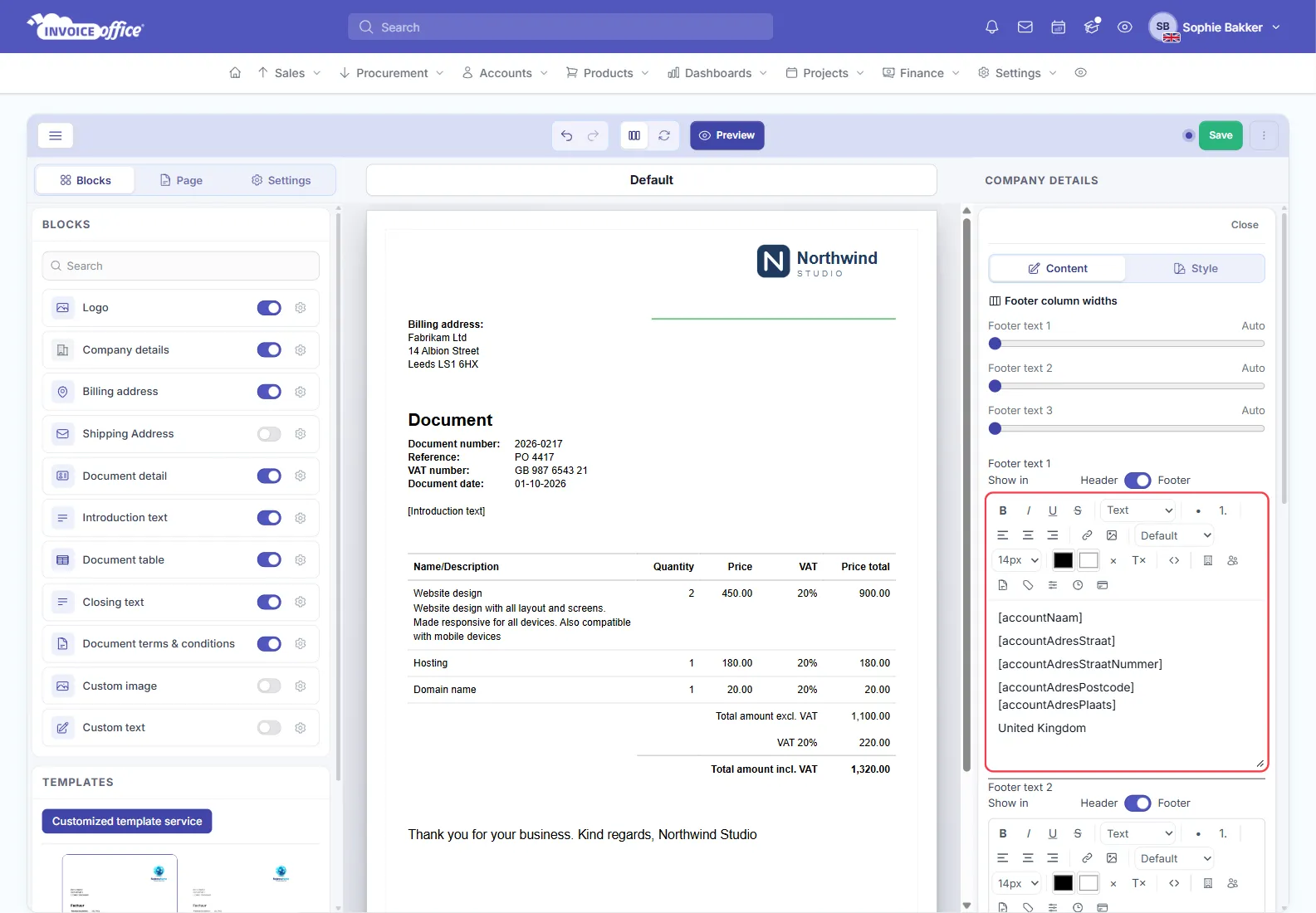
Each footer text is a small text editor, and its placeholder menu inserts live values from your company details — your company name, street and postcode, for example — so the footer stays right when your address or bank account changes. Keep those details up to date under Set up your company details rather than retyping them per design. When two or more texts are filled in, Footer column widths at the top of the tab sets how much room each one gets.
Close the document with a sign-off
Four blocks can sit at the end of the document, and each has a different job:
- Closing text — the sentence after the totals. This is where “Kind regards” and your name go.
- Document terms & conditions — your payment terms and legal text.
- Custom text or Custom image — anything else of your own, including a scanned signature image.
Switch the block on in the Blocks tab, then click it on the page to write its text. The text editors have a placeholder menu that inserts live values — so a sentence like “pay within … days into [your bank account], quoting [the document number]” fills itself in on every invoice.
In the advanced editor, the terms are edited on the Document design side of the switch in the toolbar, under Terms (on invoice and quote designs), and the footer texts on the Document template side.
What to put in a footer
A footer usually carries the things a customer or an auditor needs to find quickly: company name and address, VAT number, company registration number, bank details, and your phone number or email. Because the footer repeats on every page, keep it to a couple of lines — a long footer eats the room your product lines need. Show header and logo on every page, on the Page tab, does the equivalent for the top of the document.
Per language
Designs are held per language, so set the footer and the terms in each language’s design — or in the base Document design, which the other designs can follow. See Create and manage your document design templates.