The picklist turns your packing notes into a single list of what has to come off the shelf. Instead of walking the warehouse packing note by packing note, whoever is picking works from one list.
Open the picklist
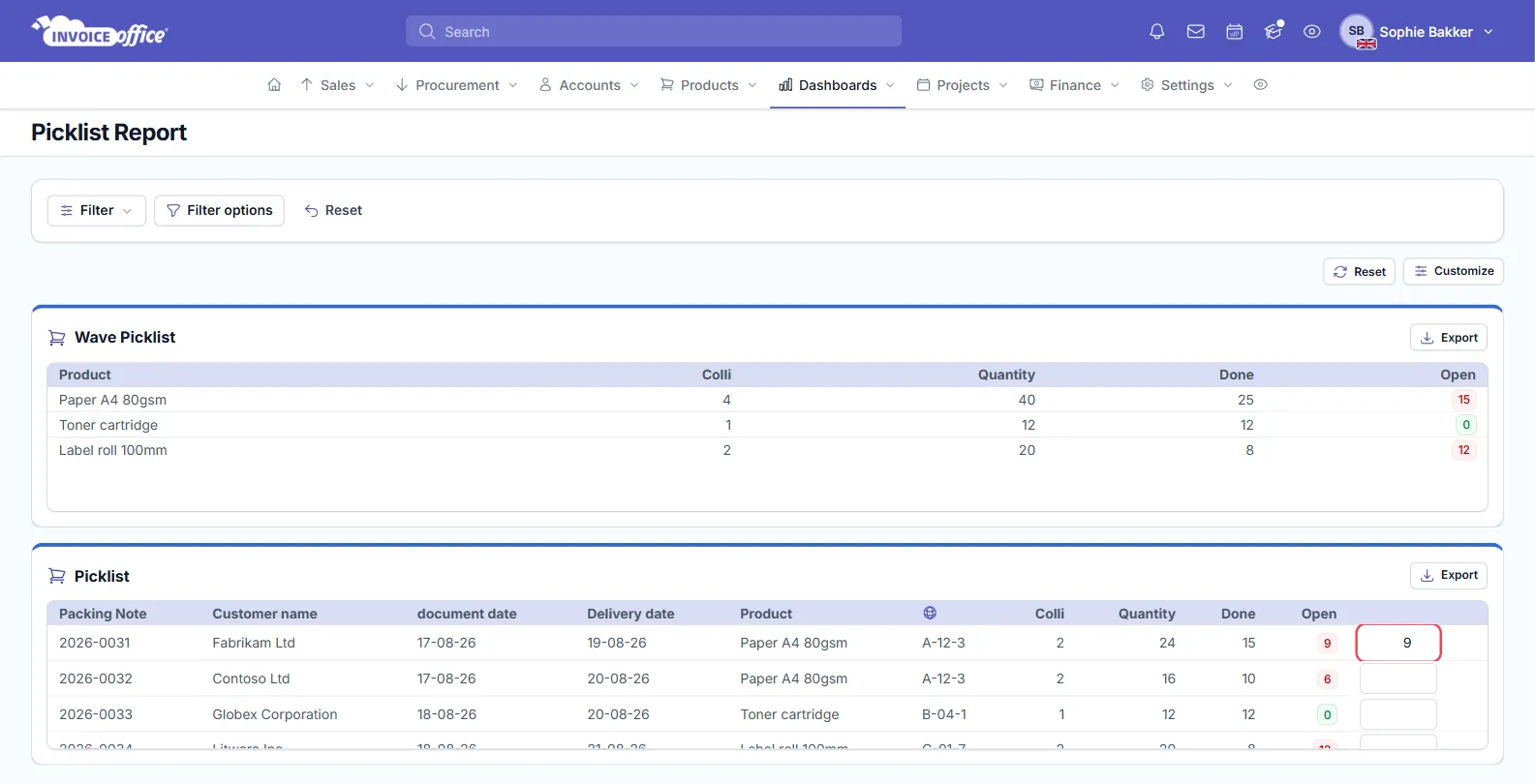
Go to Dashboards → Picklist. The page is titled Picklist Report and holds two lists.
What the wave picklist shows
The Wave Picklist at the top shows the aggregated quantity of each product across multiple packing notes: Product · Colli · Quantity · Done · Open. Open is a badge — green once a product is fully picked, red while anything is outstanding.
Wave picking — also known as cluster picking — is one of several order picking systems used in warehouses to improve efficiency. It works by releasing specific orders to the floor for fulfilment based on a common factor, such as shipping date, items, or warehouse zone.
What the picklist below it shows
The Picklist card breaks the same work down line by line, with everything you need on the floor: Packing Note · Customer name · document date · Delivery date · Product · Stock location · Colli · Quantity · Done · Open.
The Stock location column is why it is worth filling that field in on your products — see How to manage your stocks.
New to packing notes? See Create a packing note — they are what the picklist is built from.
Record what has been picked
Each row in the Picklist card ends in an input box. Type in what you have picked and the Done and Open figures update — both on that row and in the Wave Picklist totals above.
Both cards have their own Export button (PDF, Excel or CSV) if you would rather pick from paper, and Filter, Filter options and Customize across the top narrow the list down to a date range or a particular product.
Fitting it into the flow
- Goods to go out are put on packing notes.
- The picklist aggregates those packing notes into one list per product.
- Stock is picked and ticked off as you go.
- The invoice follows.
Because picking draws on stock, keep stock accurate — a picklist asking for something you do not have wastes a trip to the shelf.
Any doubts? Contact us and we will help.