To connect your bank account to Invoice Office, you use Ponto: an Open Banking service that reads your bank transactions with your permission. Once Ponto is connected, Invoice Office imports your transactions twice a day and matches them with your open invoices and purchases, so you no longer download and upload statement files. This article explains how the connection works, how to set it up, why a Ponto connection becomes inactive after a few months, and how to reconnect it.
What Ponto does
Ponto sits between your bank and Invoice Office:
- Your bank → Ponto. You give Ponto permission to read your bank account. Ponto keeps that account up to date — according to Ponto, four times a day.
- Ponto → Invoice Office. Invoice Office fetches the transactions from Ponto at 01:30 and 13:30 Central European time (CET, or CEST in summer), adds them to Finance → Bank transactions and matches them with your documents.
Ponto works with banks in several European countries. Check whether your bank is supported in Ponto’s list of banks.
The Ponto connection is a Pro feature.
New to Ponto? Set it up first
Create a Ponto account at myponto.com, link your bank account there and get the client ID and client secret of your integration. Then, in Settings → Integration connectors, click Settings on the Ponto card, enter both values, switch Active on and click Save. The full walkthrough, with the settings for matching payments, is in Set up the Ponto bank connection.
Check the status of your Ponto connection
There are two places to look, because the connection has two parts.
In Invoice Office, go to Settings → Integration connectors. The switch at the top left of the Ponto card shows whether the connection is on: grey means off. You see the same as Active on the Connect tab of the Ponto settings.
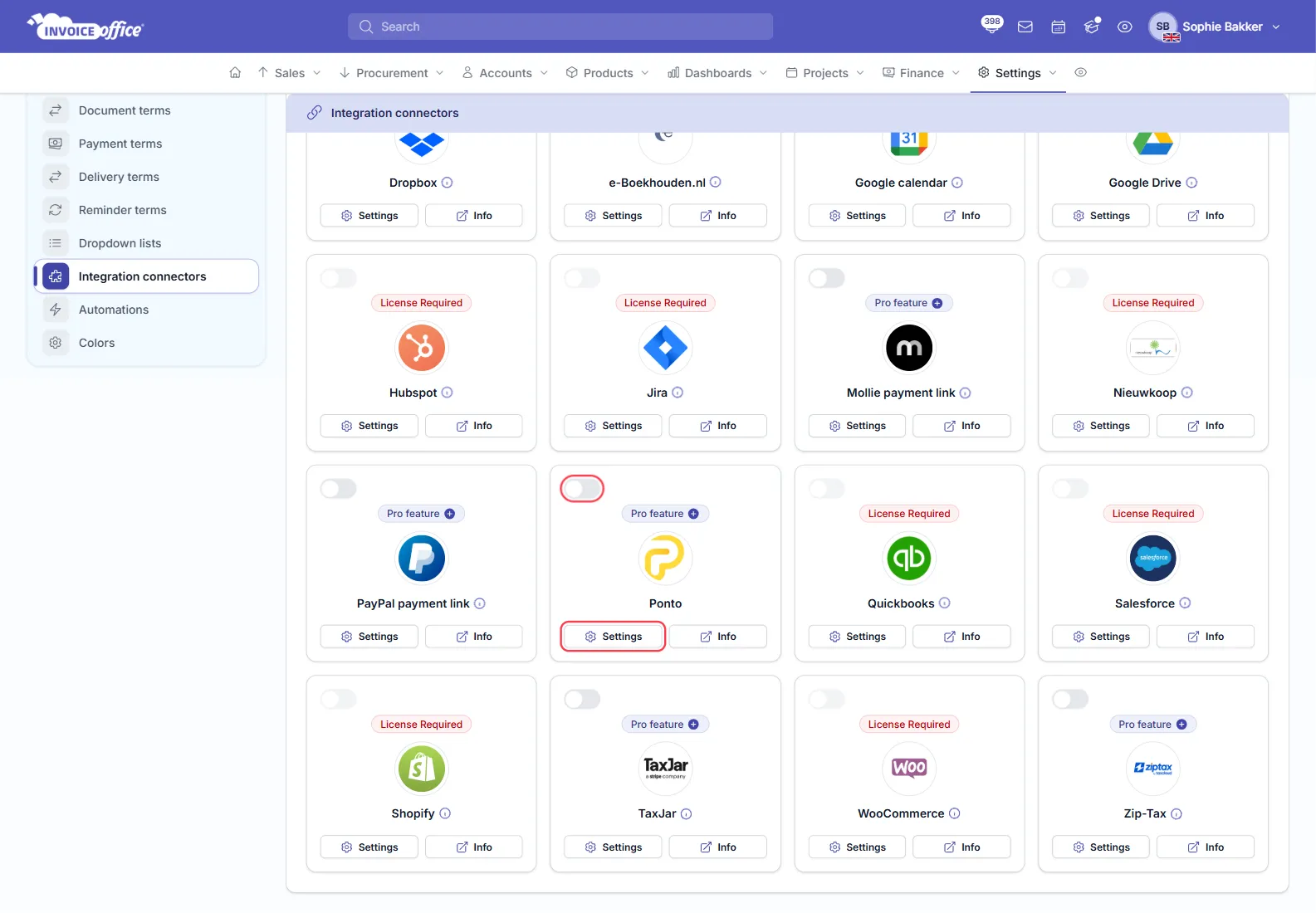
In Ponto, log in to the Ponto dashboard. It shows the status of each linked bank account and the date its authorisation is expected to expire.
Why a Ponto connection becomes inactive
Under the European PSD2 rules, your permission for Ponto to read your bank account does not last forever. According to Ponto, most banks keep it valid for 180 days; after that you have to authorise Ponto again. A bank can also end the authorisation earlier, for example after a technical incident on its side.
When the authorisation expires, Ponto stops receiving new transactions from your bank, and Invoice Office has nothing new to import. Invoice Office keeps the connection switched on in the meantime, so the switch on the Ponto card can show it as on while no new transactions arrive. Ponto emails you a reminder starting 15 days before the expiry date — check your spam folder if you have not seen one.
The connection can also be off on the Invoice Office side:
- someone switched Active off; or
- the Client Id or Client secret is empty — Invoice Office then switches the connection off at its next import and sends you a notification.
Reconnect an inactive Ponto connection
Reconnecting has two parts: first renew the authorisation in Ponto, then make sure the connection is on in Invoice Office. Invoice Office has no reauthorise button of its own.
- In Ponto: log in to the Ponto dashboard.
- In Ponto: check the status of the bank account.
- In Ponto: if it needs it, click to reauthorise and confirm with your bank.
- In Invoice Office: go to Settings → Integration connectors and click Settings on the Ponto card.
- In Invoice Office: on the Connect tab, check that Client Id and Client secret are filled in. If you created a new integration in Ponto, enter its new values.
- In Invoice Office: switch Active on and click Save.
If reauthorising in Ponto does not work, contact Ponto support.
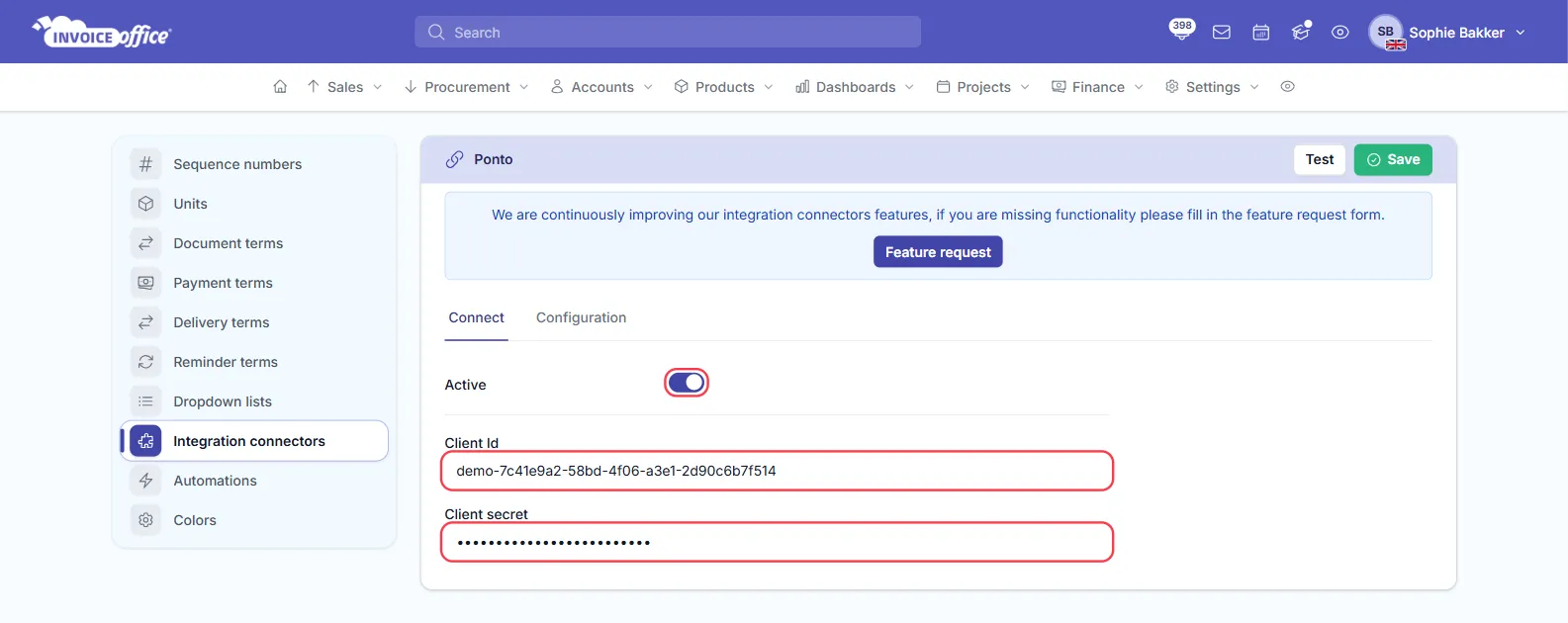
New transactions sync at the next import, at 01:30 or 13:30 Central European time (CET, or CEST in summer). Transactions that are already in Invoice Office are not added again.
Still no transactions?
- Check your notifications — the bell icon at the top of the screen. Integration connector connection issue means Ponto refused the connection, for example because the client ID or secret is wrong; Integration connector no key or secret configured means one of them is missing; Integration connector unknown error means something else went wrong — for example, your Pro licence has ended.
- Check your licence. The Ponto connection needs an active Pro licence.
- Import a statement file in the meantime. You can import your bank statement as a file while you sort out the connection — see Import and reconcile bank statements.
More checks are in Set up the Ponto bank connection.